liveBook · Manning

Android App Bundle

As explained in .NET MAUI in Action

Android App Bundle is Google's publishing format containing an Android application's compiled code and resources for distribution through Google Play.

An Android App Bundle (AAB) is the signed Android build artifact produced for release and passed from a GitHub Actions build job to a later deployment job. section 12.2.2

Publishing a signed bundle

Run dotnet publish for the MAUI project with -f:net7.0-android, -c:Release, and Android signing properties, then upload the matching *Signed.aab path as a workflow artifact.

Figure 12.8 The first step in this job checks out the code from the repo. The next will retrieve the Android signing keystore from GitHub Actions secrets and convert it from a base64 string. The next two steps set up dependencies (.NET and the .NET MAUI workloads). After that, the next step creates a signed build, and the final step uploads the signed build to GitHub, ready for the deploy job to pick it up later.
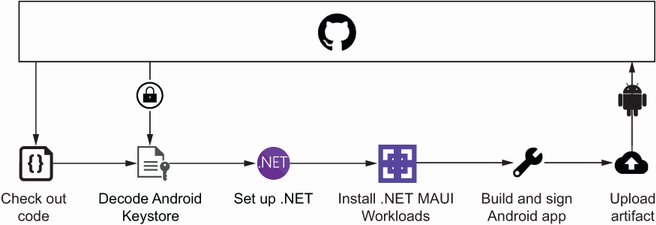
Follow the workflow from checkout and secret-based keystore recovery through dependency setup, signed publishing, and artifact upload. section 12.2.2

How .NET MAUI in Action covers it

How deep it goes
Explains signing, publishing arguments, and artifact upload steps without detailing Google Play submission.
Examples
Uses a MAUI StockTake project, a generated keystore, GitHub secrets, and a *Signed.aab upload path.
What it assumes
Assumes a .NET MAUI project and signing credentials, while showing how to encode, store, decode, and apply the keystore.
What you can do after
Build signed Android bundles and pass them between automated workflow jobs.
How it connects
Connects Android signing with .NET MAUI, MSBuild, GitHub Actions, and deployment artifacts.

This explainer was generated by Manning's knowledge graph from the text of .NET MAUI in Action. The section links point to the parts of the book it draws on.