An annotation interface lets people label data. Its design affects annotation quality and efficiency, so it should fit the task, the data, and the annotators. section 2.4.1 section 11.0
For a quick interface, start with practical choices that reduce effort and help prevent mistakes:
- Use binary choices where possible, and avoid response patterns that prime annotators. section 1.4.4
- Keep attention on one part of the screen, provide hot keys for actions, and include a back or undo option. section 2.4.1
- Use familiar interaction conventions and allow keyboard-driven responses. section 1.4.4
Labeling disaster-related headlines
A simple command-line interface can collect binary labels. Because most headlines are not disaster-related, making that label the default can save effort. A back option lets annotators correct mistakes, including those encouraged by repeatedly choosing the default. section 2.4.1
A quick interface can suit exploratory annotation when the task and labels are understood and one person works at a time. Deployed systems may also need quality control, refined label instructions, and tracking for multiple annotators working in parallel. section 2.4
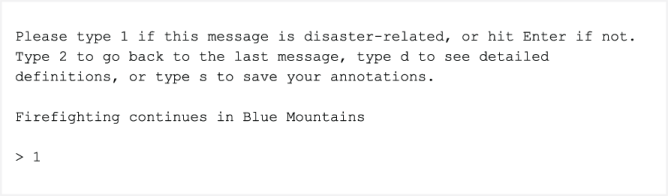
View the command-line interface used for the headline-labeling example. section 2.4.1