AppendToMapping adds custom logic to a .NET MAUI handler mapper after its default mappings run. Because the appended logic runs last, it takes precedence over defaults, making it the usual choice for changing a control’s native appearance beyond the cross-platform API. section 11.3.2
Call it on a handler’s Mapper with a string key and an Action. The callback receives the platform-specific handler and the cross-platform view. Unlike ModifyMapping, AppendToMapping can use a new key; ModifyMapping must use the key of an existing default mapping. section 11.3.2
Choose a mapper method by the kind of change needed:
- Use PrependToMapping to add a mapping before defaults without overriding them. section 11.3.2
- Use ModifyMapping only when changing an existing default mapping and its dictionary entry is understood. section 11.3.2
- Use AppendToMapping for most customizations that must win over default control settings. section 11.3.2
A handler mapper applies to every control instance served by that handler. For a customization meant for one specialized control, subclass the control and test the callback’s view before changing the native PlatformView. This prevents a BorderlessEntry mapping from affecting every Entry. section 11.3.3
Remove an Entry border selectively
Create a BorderlessEntry subclass and append a RemoveBorder mapping to EntryHandler.Mapper. Inside the callback, continue only when view is BorderlessEntry. Separate native changes with compiler directives: Android clears the background, iOS and Mac Catalyst clear the background and border style, and Windows removes border thickness, background, and focus visual margin. Windows can also require platform resource overrides for its text-control border thickness. section 11.3.3
Figure 11.12 This code opens a lambda expression for appending mappings to the handler for the cross-platform Entry control. The mappings for this control to platform-specific controls are in the EntryHandler, which is in the Microsoft.Maui.Handlers namespace. The AppendToMapping method has been used, which is on the Mapper property of the handler. The key for this mapping profile is RemoveBorder, but if it was using the ModifyMapping method instead, an existing key in the mapping dictionary would need to be used. The Action gets two arguments passed in: the handler instance and the view being customized.
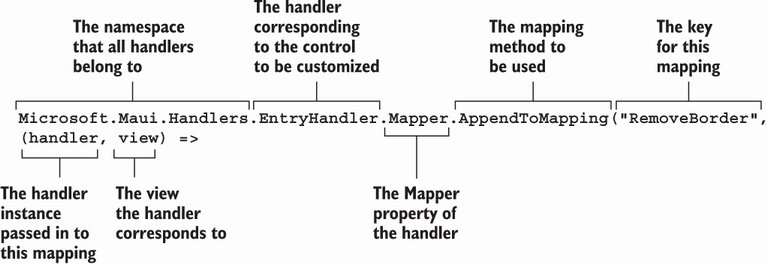
Inspect the callback shape: AppendToMapping is called on EntryHandler.Mapper with a custom key, while the lambda receives the handler and view being customized. section 11.3.2
Listing 11.12 The conditional check in the mapping code
Microsoft.Maui.Handlers.EntryHandler.Mapper.AppendToMapping("RemoveBorder",
 (handler, view) =>
{
    if (view is BorderlessEntry)     #1
    {
    }
});
Use the view-type check to keep a global EntryHandler mapping limited to BorderlessEntry instances. section 11.3.3
Keep handler logic with startup configuration, platform-specific folders, or the custom control itself. Keeping it in the custom control can place all platform branches together, while partial classes and platform folders are alternative ways to organize native changes. section 11.3.2 section 11.3.3
