An application pool in IIS represents an application process. Assigning each application to its own pool keeps hosted applications isolated from one another. section 27.2.1
ASP.NET Core applications should use a No Managed Code pool. The native IIS AspNetCore Module runs inside the pool and starts the .NET 7 runtime. section 27.2.1
Configure an ASP.NET Core application pool in IIS:
- Install the Windows Hosting Bundle, including the IIS AspNetCore Module. section 27.2.1
- Open IIS, right-click Application Pools, and choose Add Application Pool. section 27.2.1
- Give the pool a name, such as dotnet7, and select No Managed Code for the .NET CLR version. section 27.2.1
- Assign the new pool when adding the IIS website, alongside the published application folder and site URL. section 27.2.1
A local IIS deployment
Create a pool named dotnet7 with No Managed Code, assign it to a website pointing at the published application folder, and bind the site to http://localhost:81. section 27.2.1
Figure 27.5 Creating an app pool in IIS for your ASP.NET Core app. The .NET CLR version should be set to No Managed Code.
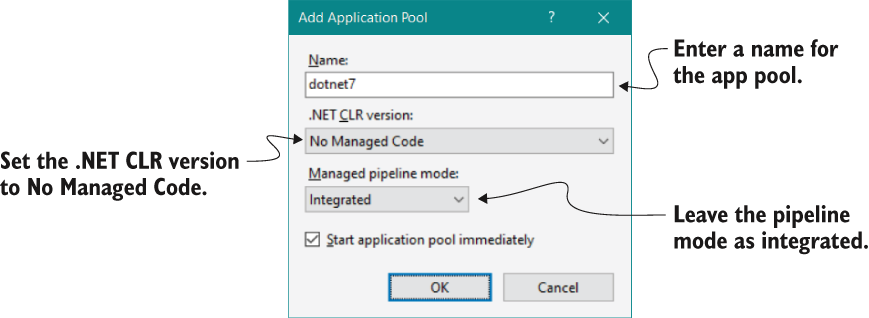
Use the IIS configuration figure to verify that the application pool's .NET CLR version is set to No Managed Code. section 27.2.1
