aria-labelledby gives an element an accessible name by pointing to other objects’ id attributes. Use it when the label is already visible elsewhere on the screen. section 7.3.4
Use the two ARIA naming options deliberately:
- Choose aria-labelledby when visible text already labels the element; choose aria-label when that text is not displayed elsewhere. section 7.3.4
- Keep labels concise—about three words at most—and make each chart element’s label accurate and meaningful. section 7.3.4
- Use the attribute to generate labels dynamically when code runs, including labels for individual bars in a graph. section 7.3.4
- If the tool cannot add ARIA labels, provide descriptive captions or other meaningful text so screen readers can convey the visual’s main takeaways. section 7.3.4
Figure 7.13 Using the graph from the previous two figures, this is what ARIA labels could look like for those bars. Each bar would have its own corresponding label, all of which are shown together in the yellow box to the right.
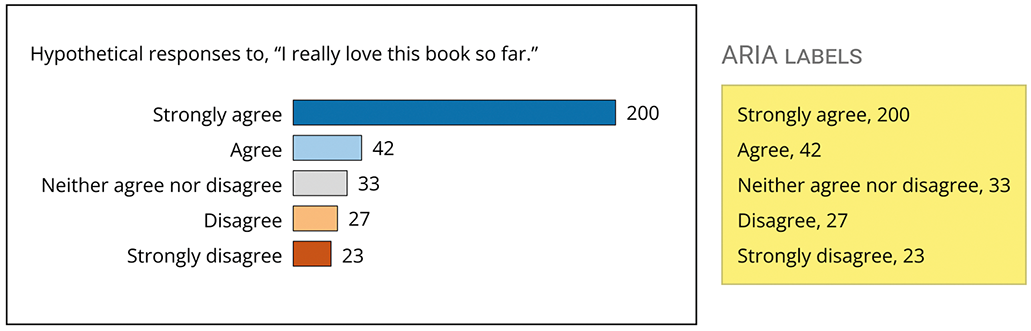
Inspect how each bar in a graph can receive its own concise ARIA label, with the labels shown together for comparison. section 7.3.4
