Arize Phoenix is an open-source observability platform for tracing and evaluating agent systems. It captures workflows, model responses, tools, sessions, latency, token usage, costs, and metadata so complex agent behavior becomes inspectable rather than guesswork. section 7.4 section 8.3.6
Use Phoenix to inspect an agent across several operational layers:
- Trace each agent turn and tool call, then drill into workflows, agents, and raw LLM responses. section 7.4.1
- Filter activity with session, user, turn, intent, and other metadata; correlate traces with identifiers such as session_id and tool_call_id. section 8.3.6
- Monitor operational measures such as latency, token usage, tool success, errors, and cost, alongside quality and product measures when instrumented. section 7.4 section 8.3.6
- Turn captured spans into datasets, run evaluators, and feed results back into prompts, tools, and policies. section 7.4.3
Smallest tracing setup
Run Phoenix locally in Docker, register a project through its OpenTelemetry integration, clear default trace processors, and wrap the agent workflow in a trace. The Projects dashboard then exposes traces, sessions, metrics, configuration, latency, token usage, and raw model responses. section 7.4.1
Figure 7.10 Viewing the dataset and clicking Run Experiment shows the generated code. You can copy the code into a Python file to create an experiment or evaluation.
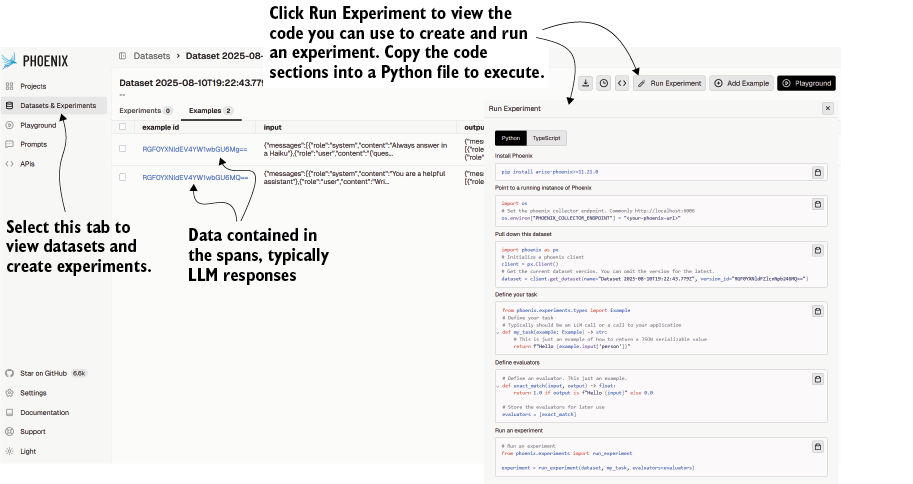
Use the generated experiment code as a bridge from selected response spans to a repeatable evaluator run. section 7.4.3
