When two devices meet over WiFi, Bluetooth, or NFC, an attacker may control that connection. An authenticated channel adds a trusted path—such as a device screen or an in-person exchange—that preserves integrity and authenticity, but not confidentiality. section 11.3.1 section 11.4
Use the channel carefully:
- Exchange public information, such as a public key or digest; avoid exporting secrets because others may observe the channel. section 11.3.1
- Import the displayed data by scanning a QR code or typing a human-readable value into the other device. section 11.3.1
- Use the provisioned keys for a mutually authenticated key exchange over the insecure connection. section 11.3.1
Pairing two devices
One device displays its public key or a digest on-screen. A person transfers that public data to the other device, allowing both devices to authenticate one another without sending secrets through the visible channel. section 11.3.1 section 11.4
Figure 11.13 User-aided authentication protocols that allow a human to pair two devices are modeled with two types of channels between the devices: an insecure channel (for example, NFC, Bluetooth, WiFi, and so on), which we assume is adversary-controlled, and an authenticated channel (for example, real life), which does not provide confidentiality but can be used to exchange relatively small amounts of information.
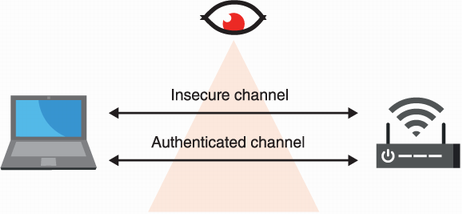
Compare the adversary-controlled insecure channel with the authenticated but non-confidential channel used for small amounts of public information. section 11.3.1
