Automatic scrolling keeps a chat view focused on newly added or selected content. In a streaming conversation, it can reveal each arriving message without requiring manual scrolling, improving navigation through long responses. section 2.4
Implement the behavior around an anchor, visibility checks, and an explicit user-control policy:
- Render an anchor after the message list and scroll it into view when the conversation changes. section 8.1.1
- Gate scrolling with a trackVisibility prop, useIsAtBottom, and useInView so the view moves only under the intended conditions. section 2.5.2
- Use smooth scrolling through scrollIntoView, then pause automatic movement when the user reviews older messages. section 2.5.2
- Provide a Scroll to Latest Message control when new content arrives while automatic scrolling is paused. section 2.5.2
Minimal React pattern
Place an anchor after the messages and react to conversation updates: useEffect(() => { scrollToBottom(); }, [conversation]);. Keep the anchor inside the message-list container, and add bottom padding such as py-24 so the input field does not obscure the final message. section 8.1.1
Figure 2.6 The <Autoscroll/> component works by triggering a scroll to the bottom of the page. The criteria that trigger the autoscrolling behavior are as follows: the trackVisibility prop is set to true, the component is at the bottom of the viewport (determined by the useIsAtBottom hook), and the component is not currently in view (determined by the useInView hook).
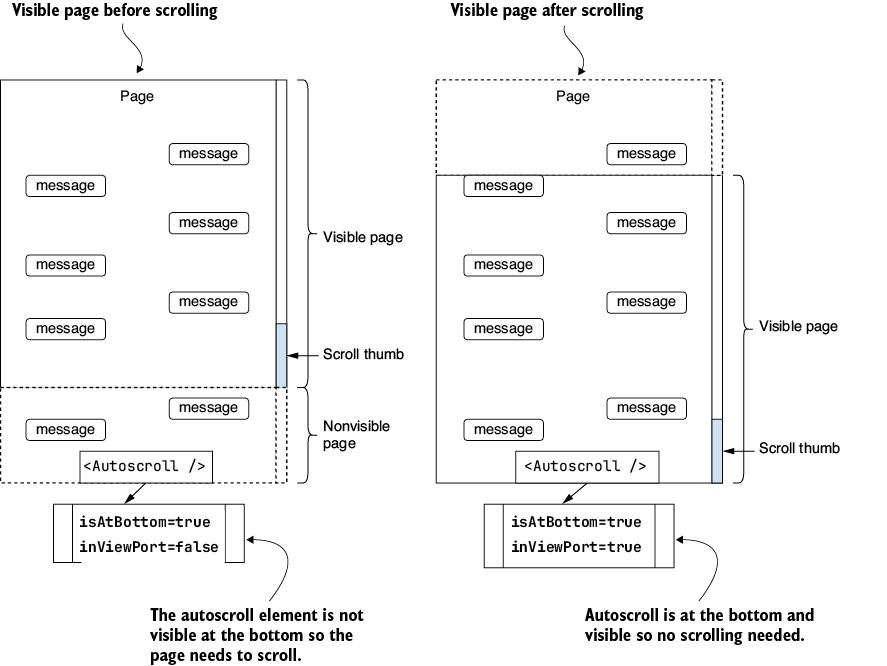
The interaction diagram shows how trackVisibility, useIsAtBottom, and useInView jointly trigger scrolling to the conversation bottom. section 2.5.2
