An Auto Scaling group manages a pool of EC2 instances. It launches instances from a launch template, keeps the configured number running, and replaces instances that fail health checks. It can also grow or shrink the pool as demand changes. section 17.1 section 13.2.2
Configure the group around a launch template:
- Put the AMI, instance type, security settings, and bootstrap script in the launch template. Put the subnets where instances may run in the Auto Scaling group. section 13.2.2
- Set minimum, maximum, and desired capacity. The minimum protects baseline capacity; the maximum limits how far the pool—and its cost—can grow. section 17.1
- Choose EC2 or load-balancer health checks, allow a grace period for startup, and attach a load-balancer target group when instances serve web requests. section 17.1
- Add a scaling policy when fixed capacity is not enough. A schedule handles predictable changes; a CloudWatch alarm can respond to a metric such as CPU usage. section 17.2
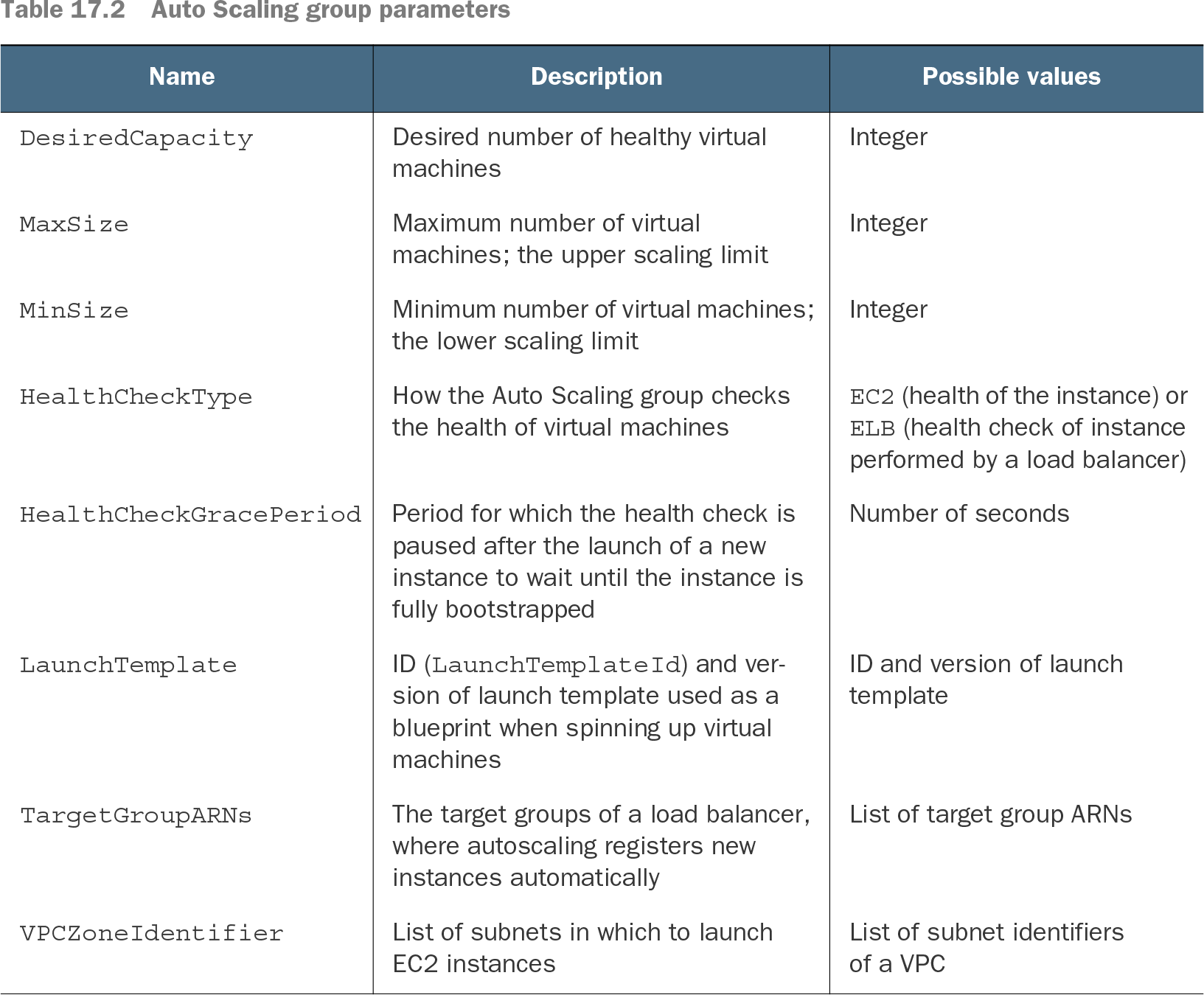
Table 17.2 Auto Scaling group parameters (view table figure)
Use the parameter table to check the capacity, health-check, launch-template, and target-group settings before creating a group. section 17.1
Recover a Jenkins server across availability zones
Set MinSize and MaxSize to 1 and allow subnets in two availability zones. If the instance is terminated, the group starts a replacement; its instance ID and IP addresses can change. Store Jenkins state on EFS rather than relying on an EBS volume tied to one availability zone. Provide a stable endpoint separately, because replacing an instance does not preserve its IP addresses. section 13.2.2 section 13.2.3
Scale web servers and workers
A WordPress group uses a load balancer and a target-tracking policy based on average CPU usage. A separate queue-processing example uses CloudWatch alarms and step scaling to add a worker when an SQS queue grows. In both cases, keep shared data off replaceable instances and give clients a stable load-balancer or queue entry point. section 17.3.1 section 17.3.2 section 17.3
Groups also support deployments: update the launch template to use a newly built AMI, then use a rolling update to replace instances. Scaling and replacement improve resilience, but they do not by themselves preserve local state or give a replacement instance the same address. Remove example stacks when finished to avoid unwanted charges. section 15.3 section 13.2.3