An availability group is a SQL Server high-availability and disaster-recovery option that uses log streams to synchronize database replicas across servers. It can provide automatic failover for a primary-server outage, or manual failover for disaster recovery. The mistake is treating either capability as proof that every failure scenario is covered. section 9.11 section 13.1
A two-replica availability group in separate racks within one data center removes some local single points of failure, but it is not necessarily disaster recovery. A data-center power loss, flood, or core-network failure can still take down both replicas. Recovery may then require infrastructure elsewhere and restoration from backups. section 13.1
Figure 13.1 HA topology with availability groups providing automatic failover in a single site
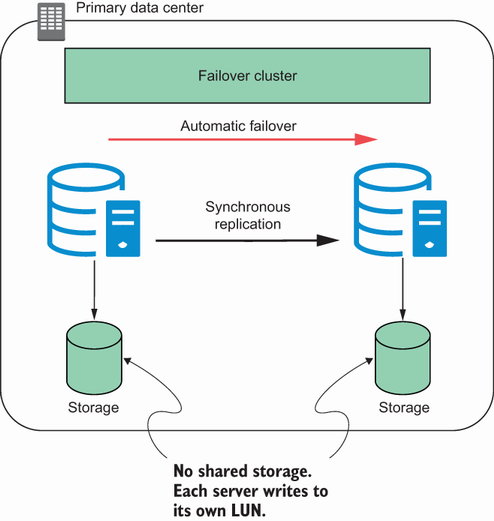
Compare a single-site automatic-failover design with cross-site manual failover and a combined HA/DR layout. The placement of replicas determines which failures can be handled automatically and which require an operator. section 13.1
Use availability groups as part of an operational plan, not as a blanket answer:
- Patch secondary replicas first, perform a controlled failover, then patch the former primary. This reduces a maintenance outage from a potential patching window to a brief interruption. section 9.11
- Match failover behavior to the requirement: automatic failover serves HA, while cross-site recovery can require manual failover. section 13.1
- Test DR regularly with users. Synchronization alone does not prove that failover works or that performance after failover is acceptable. section 13.6
- Check write volume and workload characteristics before choosing the design. Capacity planning and DR testing help prevent extended downtime during failover. section 13.4 section 13.6
The overnight warehouse mistake
A large data warehouse uses synchronous commit and automatic failover. Heavy ETL activity builds a commit queue on the secondary because the primary waits for confirmation before committing. Switching to asynchronous commit improves performance but requires manual failover; even then, FULL recovery logging can add I/O and leave the ETL window unmet. A failover cluster may be a better fit. section 13.4
