AWQ is a post-training weight quantization method that uses activation statistics to protect important channels before rounding. It targets low-bit LLM deployment without GPTQ’s Hessian-based error compensation or sequential column processing. section 7.4
For a linear layer y = Wx, each weight column multiplies an input activation channel. A small weight can matter greatly when its activation is large: rounding 0.001 to zero loses an output contribution of 1.0 when the activation is 1,000. AWQ estimates channel importance using the mean absolute activation over calibration samples, rather than weight magnitude alone. section 7.4
A typical 4-bit AWQ workflow:
- Collect calibration activations and compute their mean absolute value per input channel. section 7.4
- Search scaling exponents α using normalized activation magnitudes, sⱼ = (actⱼ / max(act))^α, and select scales that minimize post-quantization reconstruction error. section 7.4
- Multiply weight columns by their scales, apply group-wise round-to-nearest quantization, and compensate with inverse activation scales. Where applicable, fold the inverse into the preceding LayerNorm. section 7.4
Before quantization, the transformation is exact: WX = (W diag(s))(diag(s)⁻¹X). After quantization, the rescaled weights approximate the original output. Too little scaling leaves salient channels exposed; too much can inflate a group’s quantization scale and distort other channels. section 7.4
Figure 7.13 AWQ algorithm flow. Calibration data produces per-channel activation scales (top). A grid search over the scaling exponent α finds the best per-channel scale vector s* that minimizes reconstruction error after quantization (center). The optimal scales are applied to weights before standard group-wise quantization, then the inverse is folded into the preceding LayerNorm—producing an INT4 model with zero runtime overhead.
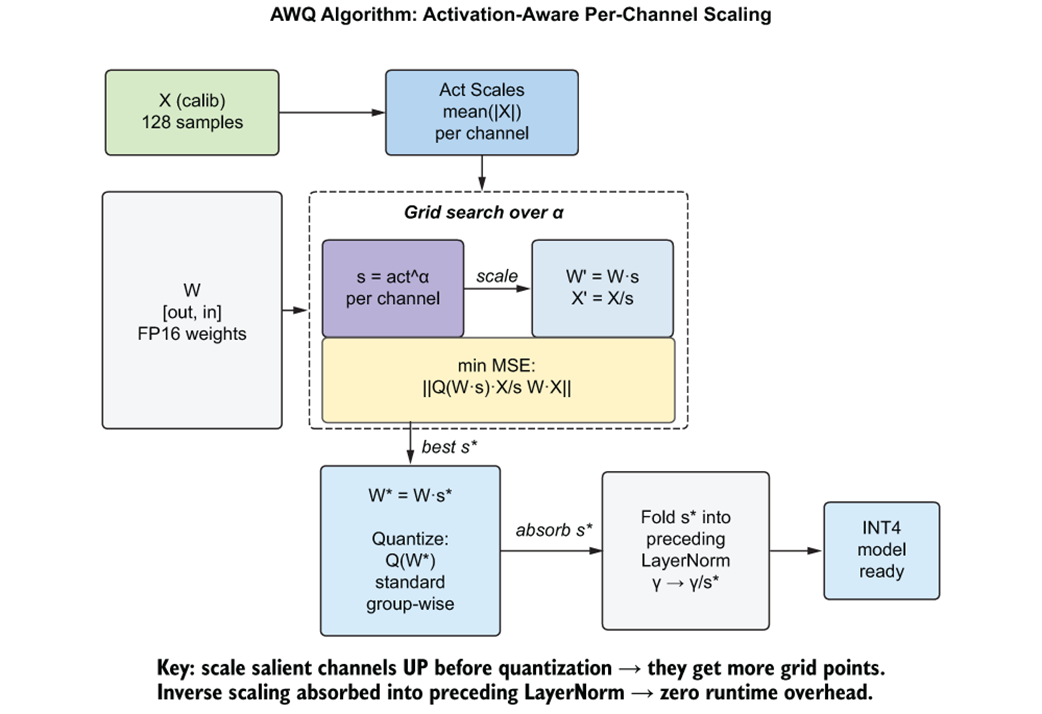
The flow connects calibration, scale search, group-wise quantization, and inverse-scale folding. section 7.4
OPT-6.7B reconstruction and quality
For layer 0’s fc1 at 4-bit group size 128, AWQ reduced reconstruction MSE by 17.1× versus round-to-nearest. Across all 32 fc1 layers, the mean reduction was 6.5×. On WikiText-2, AWQ perplexity was 15.67 versus 16.86 for round-to-nearest and 16.31 for FP16; the difference below FP16 was within evaluation variance. The AWQ model loaded in 3,613 MB versus 12,700 MB for FP16. section 7.4
For deployment, AutoAWQ can quantize and save a model with 4-bit weights, group size 128, a zero point, and GEMM configuration. Validate the deployed model rather than assuming that lower reconstruction error guarantees identical outputs: on an L4 server, a Qwen2.5-3B-Instruct AWQ endpoint agreed with its FP16 reference on 89.9% of token positions across an eight-prompt golden set. The comparison also favored AWQ in throughput, latency, and energy per token. section 7.4 section 12.3.3
Listing 7.12 AWQ production deployment with AutoAWQ
from awq import AutoAWQForCausalLM
from transformers import AutoTokenizer

model = AutoAWQForCausalLM.from_pretrained(
    "facebook/opt-6.7b", safetensors=False
)
tokenizer = AutoTokenizer.from_pretrained("facebook/opt-6.7b")

quant_config = {
    "zero_point": True,       #A
    "q_group_size": 128,      #B
    "w_bit": 4,               #C
    "version": "GEMM",        #D
}

model.quantize(                #E
    tokenizer,
    quant_config=quant_config,
    calib_data=calib_data,
)

model.save_quantized("./opt-6.7b-awq-4bit")   #F
The deployment listing shows the AutoAWQ configuration, calibration call, and quantized-model save step. section 7.4