A password fetched at startup can become a trap: when it expires, database requests fail. AWS Secrets Manager can automate password rotation, but the application must also recover gracefully. section 11.5.3
When a database rejects an expired password, the application should:
- Catch the authentication error, clear the cached password, fetch the fresh secret, and retry the operation. section 11.5.3
- Use a connection pool or framework integration to avoid repeating this recovery logic around every query. section 11.5.3
Figure 11.7 Mature architectures "catch" authentication failures and swap in fresh secrets without stopping the application.
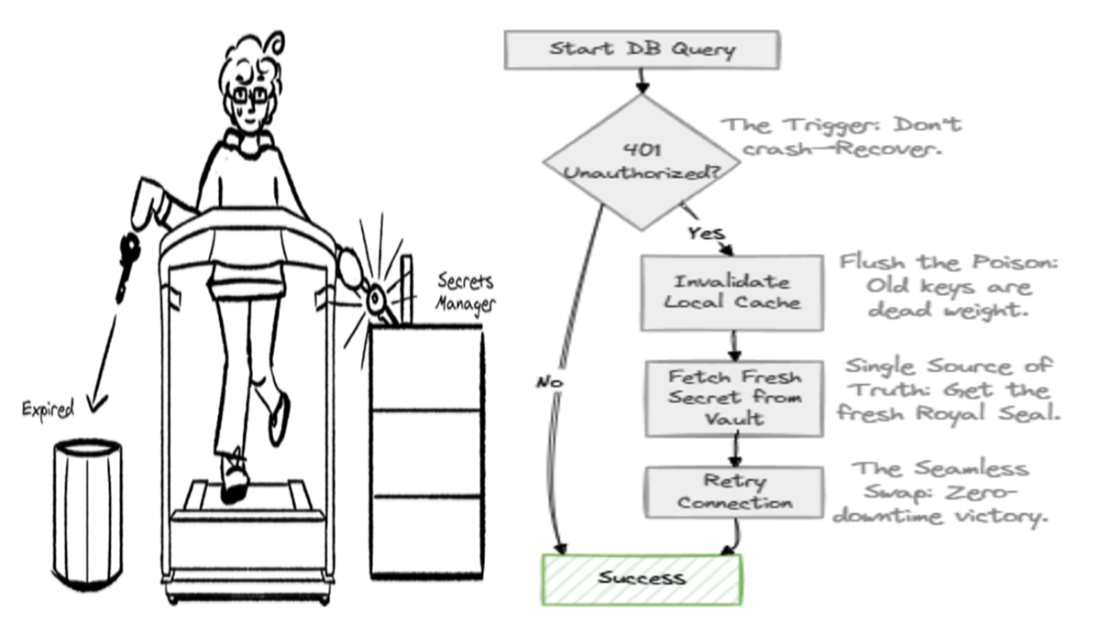
Shows how an application can catch an authentication failure and switch to fresh credentials without stopping. section 11.5.3
