Azure AI Search supports a production search layer for SQL-backed product data: define an index, store retrieval-ready text and embeddings, then use hybrid text-and-vector search rather than relying on keywords or vectors alone. The index design determines which fields are searchable, retrievable, filterable, sortable, and facetable. section 3.1 section 3.4
Figure 3.2 A correctly set-up Azure AI Search Index. Make sure to set the Retrievable, Filterable, Sortable, Facetable, and Searchable columns exactly as shown in this image.
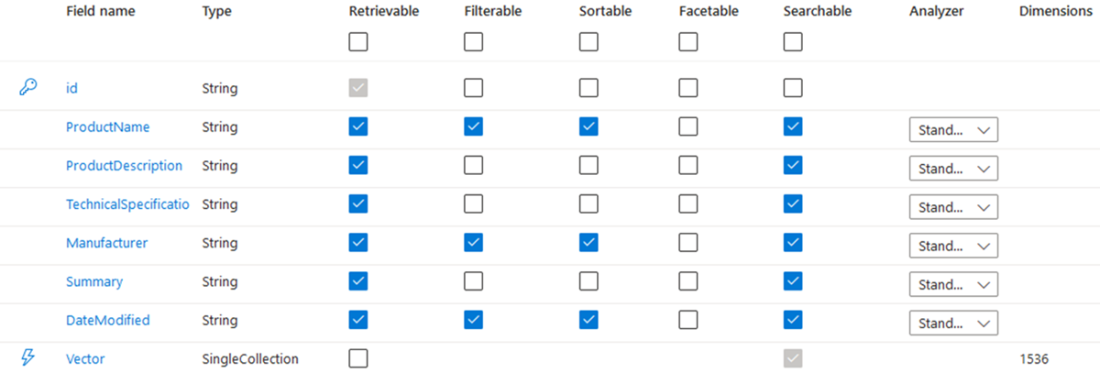
Use the index configuration as a checklist for field capabilities. Product fields and a combined Summary field are stored as strings; Vector stores each record embedding. section 3.1
A practical ingestion workflow is:
- Create a search service and index, choosing a nearby location and an appropriate pricing tier; use the free tier for experiments and remove unused services to control cost. section 3.1
- Map SQL columns such as ProductName, ProductDescription, TechnicalSpecifications, and Manufacturer, and combine them into a Summary text for embedding. section 3.1
- Fetch database records in batches instead of loading millions of rows at once, reducing database and RAG-system bottlenecks. section 3.2
- Summarize and clean each record, generate an embedding through OpenAI’s embedding API, then upload the text and vector as a search document. section 3.2
- Keep the index synchronized by updating modified records and removing deleted ones when source data changes frequently. section 3.4
Figure 3.3 Workflow for ingesting structured SQL data into Azure AI Search. The process begins by connecting to an SQL database and fetching records in batches. Each batch is summarized, cleaned, embedded, and prepared as documents for upload. The pipeline loops through remaining records until all data is processed and uploaded.
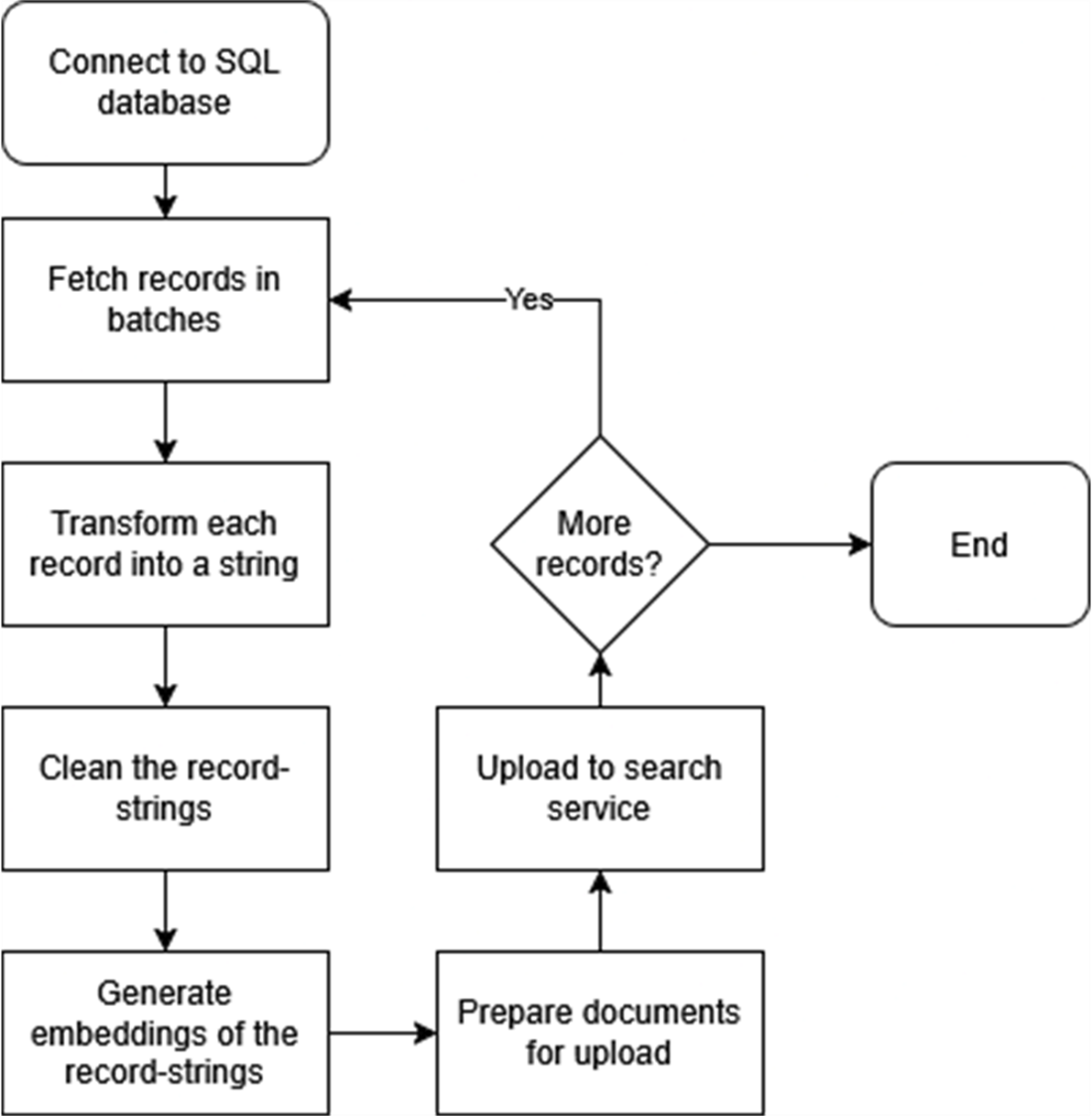
The ingestion flow connects to SQL, processes records batch by batch, converts each into cleaned summarized text and an embedding, and uploads documents until complete. section 3.2
Product-search index
A product record can retain its name, description, technical specifications, and manufacturer while also producing a Summary and Vector. This lets the same index serve text retrieval and semantic vector retrieval for product queries. section 3.1 section 3.4
Treat the index as an operational component. Under load, trace behavior with logging, test demand with Locust, and scale only the constrained resource—AI Search tier, OpenAI token quota, or Web App instances—to protect response time and cost. section 5.5

