Azure Blob Storage is Azure’s flexible home for unstructured data such as image files. In an image-processing application, incoming email attachments land there, the website retrieves them, and processed copies return to the same storage account. section 2.2
An email-to-album workflow
A Logic App watches an email account and copies image attachments into Blob Storage. An Azure Function notices each new blob, compresses the image, and writes a resized copy to an output container while preserving the original. section 2.2 section 2.2.19
A practical Blob Storage workflow includes:
- Confirm that the Logic App successfully copied an attachment, then inspect its URL, type, size, and other properties in the storage account. section 2.2.13
- Configure an Azure Blob Storage trigger for new files and an output binding targeting a container path such as imageoutputcontainer/{rand-guid}. section 2.2.19
Figure 2.1 Application architecture overview
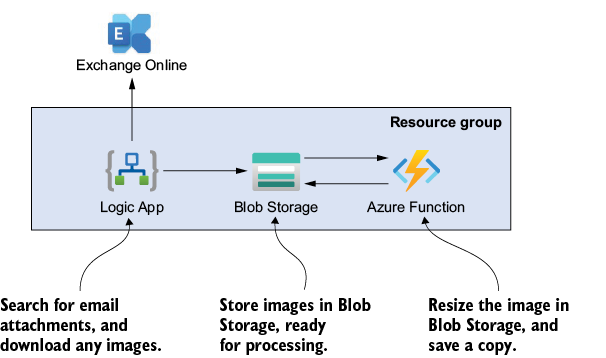
Use the architecture overview to trace email attachments through Logic Apps, Blob Storage, Azure Functions, and the website. section 2.2

