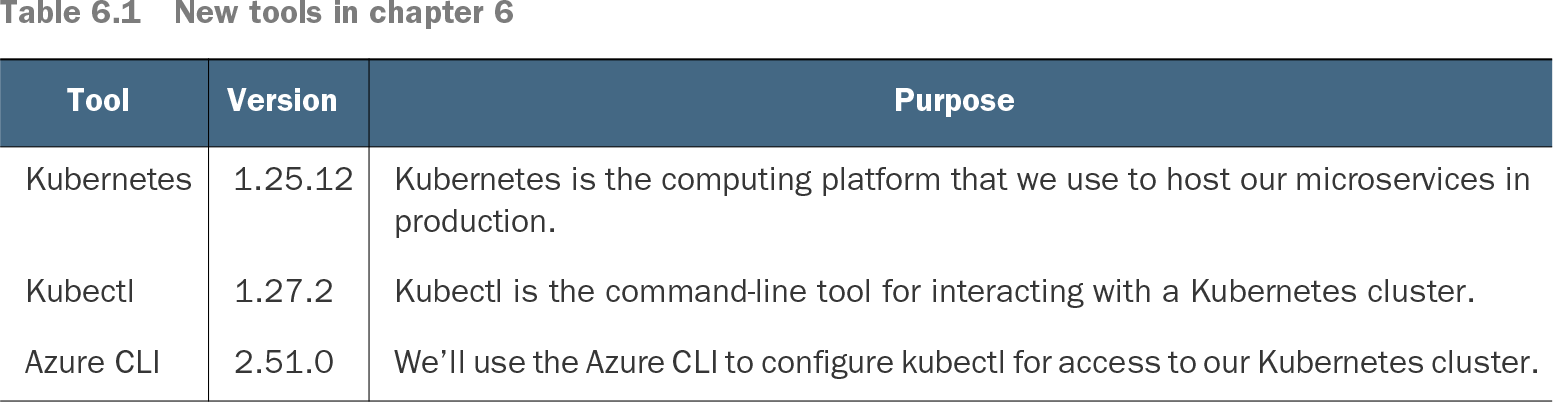
Azure CLI is Microsoft's cross-platform command-line interface for creating, configuring, and managing Azure resources.
Azure CLI is a terminal tool for creating and configuring Azure resources and connecting local tools to cloud infrastructure. Its practical role here is preparing kubectl to manage a Kubernetes cluster running on Azure. section 6.1section 6.12
A typical Azure CLI workflow is:
Install the CLI for your platform and verify it with az --version. section 6.10.1
Authenticate with az login, then inspect and select the active Azure subscription. section 6.10.2
Check region-specific Kubernetes versions with az aks get-versions and choose one currently available. section 7.6
Download cluster credentials with az aks get-credentials so kubectl can access the Azure Kubernetes cluster. section 6.1section 6.12
Retrieve container registry details with az acr show and az acr credential show, using table output when readability matters. section 7.9.6
Authenticate and select a subscription
Run az login, inspect the current account with az account show, list available subscriptions with az account list, and set the intended subscription with az account set --subscription=<subscription-id>. Verify the choice again with az account show before performing resource operations. section 6.10.2
Azure Portalalternative to · Azure Portal is Microsoft's web-based management interface for creating, configuring, monitoring, and managing Azure resources and services.
Azure Bastionuses · Azure Bastion is a fully managed Azure service that provides secure browser-based remote access to virtual machines through a virtual network without exposing them to the public internet.
Azure PowerShellalternative to · Azure PowerShell is a collection of PowerShell modules and cmdlets for managing Azure resources and services.
versionuses · A version is a distinct, identifiable state or revision of an artifact, system, or product.
This explainer was generated by Manning's knowledge graph from the text of Bootstrapping Microservices, Second Edition: With Docker, Kubernetes, GitHub Actions, and Terraform. The section links point to the parts of the book it draws on.