Azure Key Vault is a managed, centralized vault for storing and controlling access to application secrets, cryptographic keys, and certificates. It keeps credentials out of configuration files, spreadsheets, and desktop text files while allowing authorized people or applications to retrieve them. section 6.8
A new vault requires a few practical decisions:
- Choose an Azure subscription, resource group, globally unique vault name, and suitable region. section 6.8.1
- Select Vault Access Policy for straightforward experimentation, or Azure RBAC for permissions managed alongside other Azure resources. section 6.8.1
- Store secrets such as passwords and connection strings, keys for encryption and decryption, or certificates for SSL/TLS. section 6.8
- Set optional activation and expiration dates when a secret follows a replacement schedule. section 6.8.2
A safer database password workflow
Alpaca-Ma-Bags creates a vault, adds a secret named CustomerDbPassword, and retrieves its current version when needed. In production, an authorized application can pull the value programmatically through a managed identity, keeping Helen’s production password out of supersecret.txt and away from human hands. section 6.8.2 section 6.9
Figure 6.37 Create a new Key Vault.
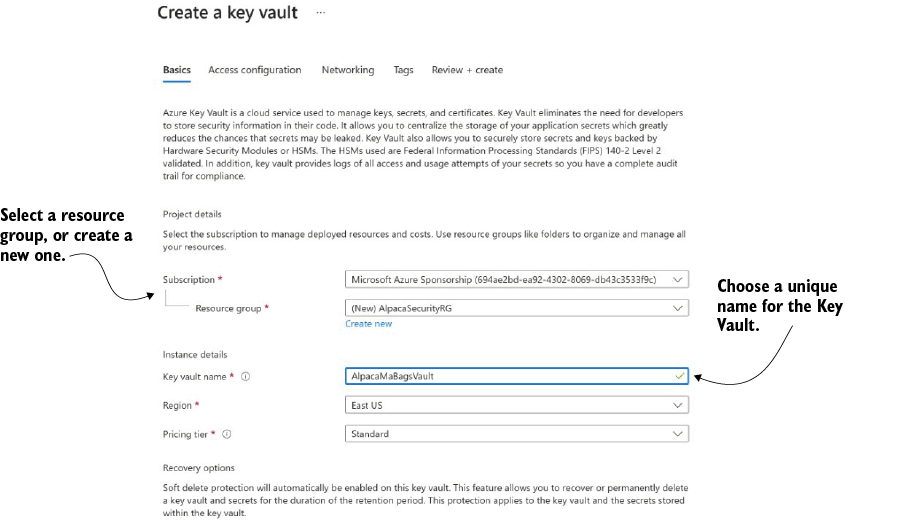
Visualizes the Azure Portal settings used to create a Key Vault, including subscription, resource group, name, region, and pricing tier. section 6.8.1

