When an application gets more traffic than one virtual machine (VM) can handle, Azure Load Balancer provides one entry point and distributes incoming requests across VMs in a backend pool. Rules determine where traffic goes; a health probe helps keep requests flowing to VMs that are ready to serve them. section 4.5 section 4.5.5
It also helps with outages. If a frontend VM stops responding, traffic can go to the remaining healthy VMs—but only if there are other VMs available. In a multi-region design, Azure Traffic Manager handles routing between regions, while Load Balancer distributes traffic among VMs within a region. section 1.2.3
The main decisions are:
- Choose the right routing service. Azure Load Balancer distributes TCP or UDP traffic; unlike Azure Application Gateway, it does not route by requested web address. It offers higher performance and lower latency than Application Gateway for the load-balancing role. section 3.3.4
- Provide multiple VMs in a backend pool. A load balancer cannot spread requests across machines that are not there. section 4.5 section 4.6
- Bring together a frontend IP configuration, backend pool, health probe, and load-balancing rule to define the service. section 4.5.5
A growing web application
An alpaca-shearing site has outgrown its single VM. With the frontend IP, backend pool, probe, and rule configured, PowerShell can create its Standard Load Balancer using New-AzLoadBalancer and the parameters -FrontendIpConfiguration, -BackendAddressPool, -Probe, and -LoadBalancingRule. Visitors use the shared entry point; the service passes their requests to backend VMs. section 4.5 section 4.5.5
Figure 1.6 Redundant Azure architecture example. This setup uses Azure Traffic Manager to route requests between regions, ensuring availability if one region goes offline. Within each region, an Azure Load Balancer directs traffic to healthy VMs, while multiple VMs prevent single points of failure. Azure SQL Database is replicated between regions to keep data consistent, so the application remains available and up to date even during outages.
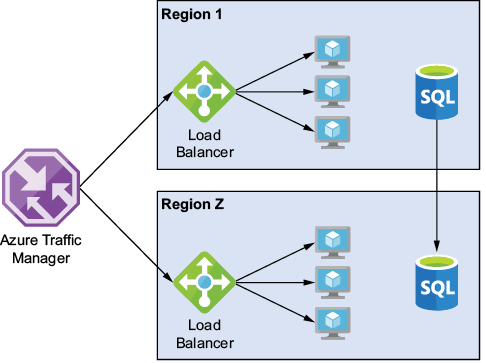
See how Load Balancer fits inside a broader availability design: it directs traffic to healthy VMs within each region, while Traffic Manager routes between regions. section 1.2.3
