Hydration lets a server-rendered React page become an interactive client-side interface. React renders the page in the browser and compares its HTML with the server-generated HTML. The initial outputs must match exactly. When they do, React can use the existing page instead of rendering it into the DOM again. section 11.1.4 section 11.5
A mismatch does not necessarily break the application, but React clears the document and renders the page again. That extra work can erase the speed advantage of showing server-generated HTML immediately. Treat identical initial output as a performance requirement, not merely a way to silence a warning. section 11.1.4 section 11.5
Make inputs to the first render available on both sides:
- For a random hero quote, choose the quote on the server outside React and pass that choice in the data package. Do not make a fresh random choice during each render. section 11.1.4
- For a saved display preference, avoid reading localStorage to determine the client's initial output: the server cannot read it. A small preference stored in a cookie can be read on the server and used for the first render. section 11.3.3
A temperature-scale preference
Suppose the server renders a temperature in Celsius, but the browser's saved preference makes React initially render Fahrenheit. Hydration fails. Store the preference in a cookie instead, then pass the server-read value into the page. In Next.js, getServerSideProps can obtain defaults through cookies-next and return them as props; in Remix, a loader can read cookie defaults and return them with the page data. Cookies suit this small setting, but their limited capacity makes them a poor substitute for large local datasets. section 11.3.3 section 11.5
Figure 11.4 React also renders the HTML page and compares the React-rendered version with the server-rendered version. This process is called hydration, and only when the two HTML versions are identical is React happy. If they aren't, React forces the browser to render the React-created HTML instead, displayed in the box with the thick border at bottom left.
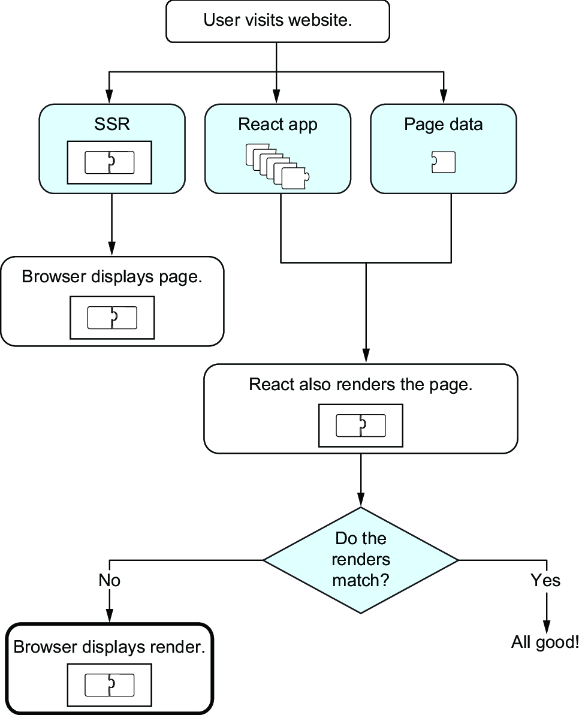
Compare the matching and mismatching render paths to see why server-rendered HTML delivers its performance benefit only when hydration succeeds. section 11.1.4
