Bearer authentication lets a client call a protected API by sending a token. A bearer token is a string containing authentication details about a user or app. Whoever has the token can use it; they do not have to prove they were its original recipient. Treat it like a password: keep it out of URL query strings, which may be logged. section 25.1.2 section 25.2
A central identity provider can sign users in and return tokens to a browser or mobile app. The client then passes a token to an API, so the API does not need to handle sign-in or manage users directly. JSON Web Tokens (JWTs) are a common bearer-token format. A JWT is typically signed to detect tampering, but it is not encrypted by default: its contents can be read. section 25.1.2 section 25.7
Figure 25.8 When an API request contains a bearer token, the token is validated and deserialized by the authentication middleware. The middleware creates a ClaimsPrincipal from the token, optionally transforming it with additional claims, and sets the HttpContext.User property. Subsequent middleware sees the request as authenticated.
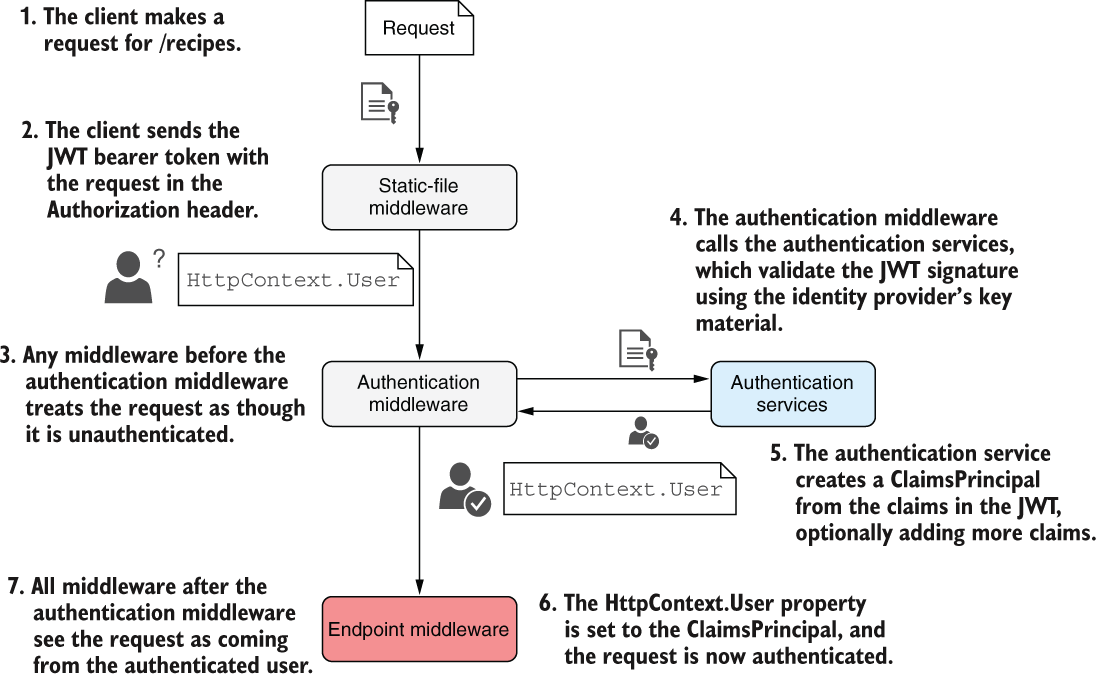
Follow a token through ASP.NET Core authentication: middleware validates and deserializes it, creates a ClaimsPrincipal, and sets HttpContext.User for the rest of the request. section 25.2
To try JWT bearer authentication in an ASP.NET Core minimal API:
- Add the Microsoft.AspNetCore.Authentication.JwtBearer package and register authentication with AddAuthentication().AddJwtBearer(). section 25.7
- Run dotnet user-jwts create to generate a token for local testing. Send it in the Authorization header as Bearer <token>. section 25.7
- Protect minimal API endpoints with RequireAuthorization() or an [Authorize] attribute. section 25.7
Testing with Swagger UI
Define a bearer security scheme and its requirements in the OpenAPI document. Swagger UI then displays an Authorize button. Enter Bearer <token>, including the prefix and space; Swagger UI attaches that value to subsequent requests in the Authorization header. section 25.5
Browser-based apps need particular care because storing bearer tokens in the browser exposes them to risk. A Backend for Frontend approach instead keeps tokens in an ASP.NET Core backend and uses an authentication cookie between the browser and that backend. section 25.2




