A beeswarm plot shows a distribution as individual circles. Each circle is pulled toward the position for its value on one axis, while perpendicular movement and collision spacing keep circles from overlapping. The result preserves every point while making clusters and spread visible. section 12.4.1 section 12.4.1
Build one with a D3 force simulation: bind data to SVG circles, use forceX() to pull each circle toward xScale(d.value), use forceY(0) to keep circles near a horizontal centerline, and add forceCollide() with a radius suited to the marks. Update each circle’s cx and cy during simulation ticks. section 12.4.1 section 12.4.1
Choose forces and mark settings deliberately:
- Set collision radius larger than the visible circle radius to create padding; for 10 px circles, a radius of 12 px leaves 2 px between edges. section 12.4.1
- Use forceX() or forceY() with collision to flatten a cluster into a beeswarm-like shape; without positioning forces, collision-separated nodes form a circular cluster. section 12.4.1
- Treat the value-axis position as approximate: the simulation balances all active forces, so a final circle position may not exactly equal its value-derived coordinate. section 12.4.1
- Use a value-dependent collision radius when circles vary in size, adding extra space so larger marks do not overlap. section 12.4.1
Normal-distribution sample
Generate 300 nodes with normally distributed value attributes, map each value to a horizontal scale, then combine horizontal positioning, vertical centering, and collision forces. The circles settle into a visible normal distribution without hiding individual observations. section 12.4.1 section 12.4.1
Character beeswarm
A beeswarm-like chart can display Romeo and Juliet characters as circles whose color represents house and whose size represents number of lines. Variable circle radii and collision padding preserve distinct characters while communicating additional attributes. section 12.4.1 section 12.4.1
Figure 12.14 The collision force d3.forceCollide() prevents the nodes from overlapping. By setting its radius() accessor function, we impose a minimum distance between the center of each node. Without positioning forces, the nodes naturally aggregate into a circle. If we combine the collision force with a positioning force, we obtain a flattened shape that resembles a beeswarm chart.
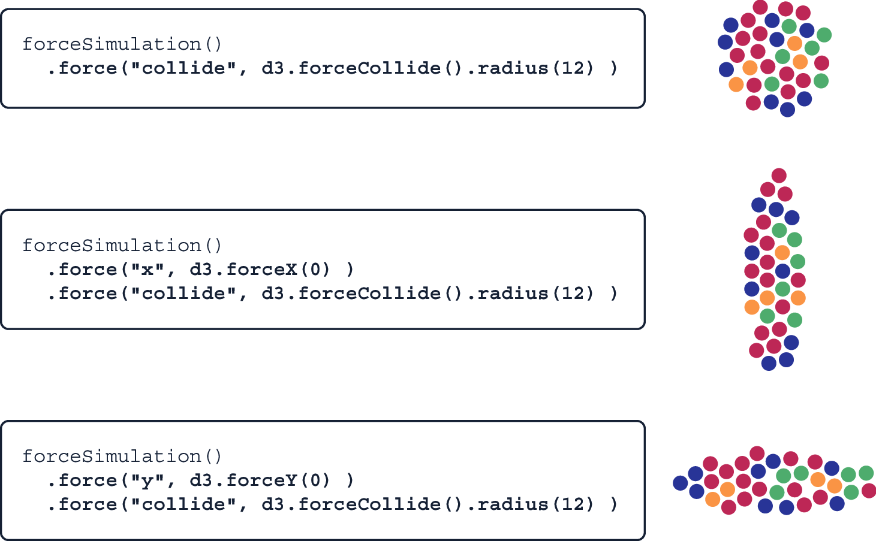
Compare the unpositioned circular cluster with the flattened result produced by combining a positioning force and collision force. section 12.4.1

