A rectangle is a basic graphical shape used to create visible regions in an SVG or Canvas drawing. In SVG, a rect element lives in the DOM, so it can be styled, manipulated, animated, and used as part of an accessible visualization. Its position and size are defined in the coordinate system of its SVG container. section 1.2.2 section 15.2.3
An SVG rect needs four attributes to appear: x and y place its top-left corner, while width and height set its dimensions. Add fill to color its interior, or use stroke to draw its border. The rx and ry attributes round its corners; a transparent fill with a stroke creates an outlined rectangle. section 1.2.2 section 2.5
Add one SVG rectangle
Append a rect to an SVG selection, then chain attr() calls so the shape and its values stay visibly connected. This rectangle starts at (10, 10), uses a data value as its width, and has a fixed bar height: svg .append("rect") .attr("x", 10) .attr("y", 10) .attr("width", 414) .attr("height", 16) .attr("fill", "turquoise"); section 2.5
Rectangles become data marks in bar charts and histograms. Bind one histogram bin to each rect, map bin boundaries through an x scale for x and width, and map the bin length through a y scale for y and height. Because SVG’s y-axis increases downward, a bar’s height is the inner chart height minus its scaled y position. section 6.2
Figure 6.5 To generate a histogram, we first use method d3.bin() to preprocess a dataset. This method returns a new dataset, where data points are distributed into bins (arrays), and each bin has a lower and an upper boundary. We then use this new dataset to append rectangles to an SVG container. The length of the rectangles is proportional to the number of data points the related bin contains, while their position corresponds to the boundaries of the bins.
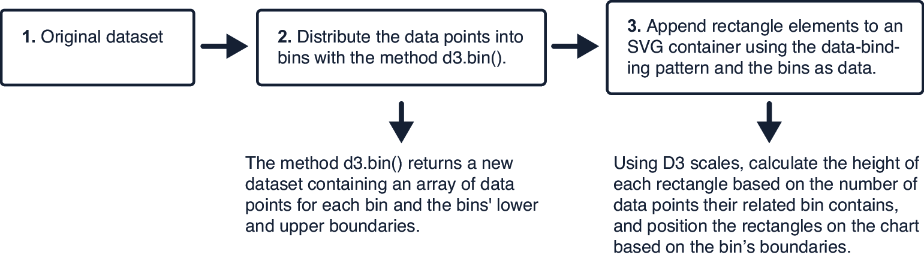
Follow the flow from binned values to one positioned rectangle per bin; rectangle dimensions encode the bin boundaries and number of data points. section 6.2
A rect can also serve as interface structure rather than a data mark. A responsive SVG grid places a rectangle inside each translated group to verify each grid cell’s size and position as column counts change. A tooltip uses a rounded, partly transparent rectangle behind text so the label remains readable without fully hiding the chart. section 14.4.2 section 7.3.1
Canvas draws rectangles differently: call context.rect(x, y, width, height), then render the current path with fill() or stroke(). Set fillStyle or strokeStyle before rendering, use roundRect() for rounded corners, and call beginPath() before a new stroked path when earlier path styles must not carry over. Shapes sharing a style can be drawn in batches. section 15.2.3
When a filtered histogram receives new bins, keep its existing rectangle elements and bind the replacement bins. Recalculate y and height from the same y scale to change each bar’s frequency while preserving its horizontal bin placement. section 7.2.3


