liveBook · Manning

Binary format

As explained in High Performance Unity Game Development

A format that represents data as encoded bytes rather than human-readable text.

A binary format stores save data as bytes rather than formatted text. Writing game data in binary avoids converting it to and from text, reducing unnecessary work, conversion bugs, and file size. section 7.1.1

For a survival game, GameData can include player direction, game time, and enemy positions. JSON and XML add labels and formatting around those values; binary writes the data as a continuous array of bytes. section 7.1.1

Writing enemy positions

A Unity save routine can use BinaryWriter to write the enemy count, then write each enemy’s x and y positions. A matching BinaryReader reads those values in sequence. section 7.1.1

Figure 7.2 When saving in binary, our GameData is written out as a continuous array of bytes.
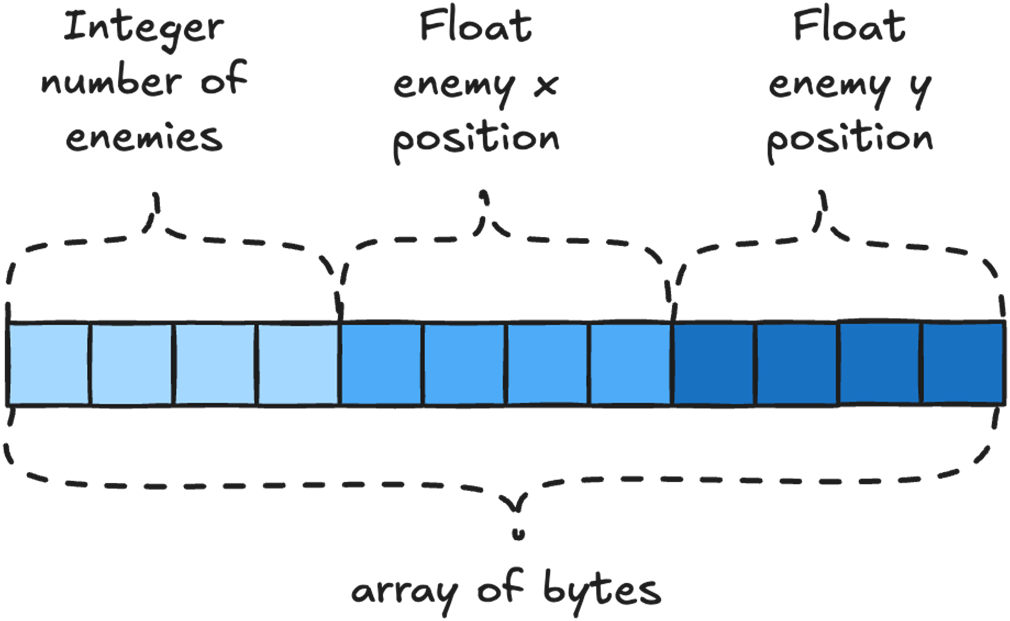
Shows GameData represented in binary as a continuous array of bytes. section 7.1.1

How High Performance Unity Game Development covers it

How deep it goes
Compares binary with JSON and XML, then sketches sequential field writes and reads without specifying a full format schema.
Examples
Uses a GameData structure with enemy positions and contrasts its binary representation with JSON and XML examples.
What you can do after
Apply BinaryWriter and BinaryReader to write and read save-data fields sequentially.
How it connects
Connects binary saving with JSON, XML, and game save data.

Related concepts

This explainer was generated by Manning's knowledge graph from the text of High Performance Unity Game Development. The section links point to the parts of the book it draws on.