A binding context is the source object a .NET MAUI view uses when resolving bindings. Set one context on a view, then bind its properties by source-property name instead of explicitly naming the source for every binding. Target properties belong to BindableObject-derived UI controls; source and target types must match unless a value converter is used. section 3.4
Figure 3.16 The binding context can be set at any level and is inherited by child components from that point down.
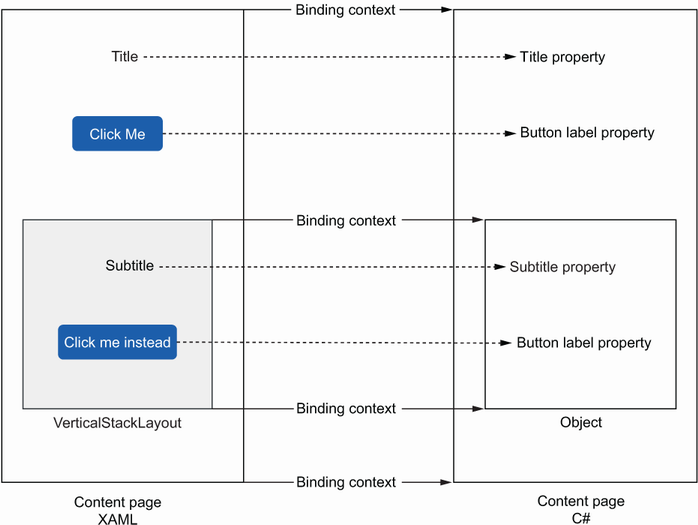
Set a context on a page, layout, or control. Child views inherit that context from the point where it is set, unless a child explicitly defines another one. section 3.4
Choose the context location to match the UI structure:
- Set a page context when most controls on the page bind to the same properties. In MauiTodo, the ContentPage names itself and uses that reference as its BindingContext, allowing a CollectionView to bind ItemsSource to Todos. section 3.4.3
- Set a control context when that control should use another view as its source; otherwise it inherits the page or parent layout context. section 3.4
- Set the context in code when the page itself exposes the UI properties. MauiMovies assigns BindingContext = this before binding layouts to Genres and Movies. section 6.2.1
- Set the context to an injected ViewModel when using MVVM. The page stores the InputViewModel, supplies navigation, and assigns it as BindingContext before controls bind to commands and state. section 9.5.3
Collection item contexts
A CollectionView can bind its ItemsSource to a collection on the surrounding context. Inside its ItemTemplate, however, the binding context becomes the individual item rather than the whole collection. A Label binding to Title therefore reads the Title property of each TodoItem. section 3.4.2
Keep bindings together when practical: placing the page context and CollectionView binding in XAML removes a code-behind ItemsSource assignment while producing the same UI. This arrangement also supports a cleaner separation of concerns when moving toward MVVM. section 3.4.3
