A binding source property is the property whose value flows to a target property. Data binding keeps the target updated when the source changes, reducing direct UI reads and writes. section 3.4 section 3.5
Use these rules when choosing or configuring a source property:
- Match the source property type to the target property type, or use a value converter when the types differ. section 3.4
- Set a view's binding context to its source object, then reference source properties by name. section 3.4
- Bind UI properties to code properties, other UI properties, or collection data such as a List displayed by CollectionView.ItemsSource. section 3.4 section 3.5
A changing source updates the UI
In a .NET MAUI page, an Entry exposes its user-entered value through its Text property. Bind a target property to a matching source property, and changes in that source value appear automatically in the target. A CollectionView can similarly use ItemsSource as a target bound to a List source. section 3.4 section 3.5
Figure 3.15 Each view (target object) can have a single binding context (source object). Properties of the target view are bound to properties of the same type on the source object.
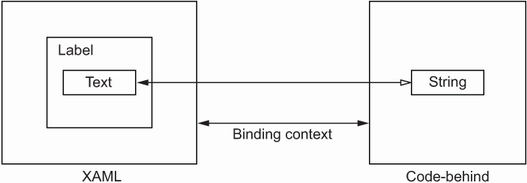
Use the diagram to distinguish the target view from its source object and see how target properties connect to source properties. section 3.4
