A block blob is the everyday Azure Blob Storage choice for large object data. It stores text or binary content as blocks and can hold up to 190.7 TiB, making it suitable for PDFs, images, videos, executable programs, and other files. section 5.3.3
Figure 5.7 Blobs are in a container, which is in a storage account. Blobs can be anything in a binary format.
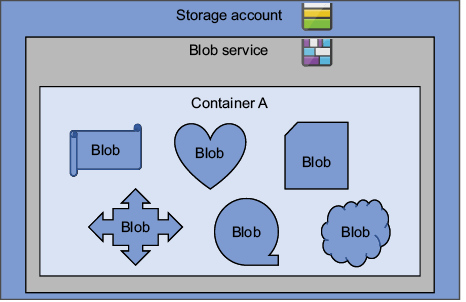
Place the blob inside a container, and the container inside a storage account; this hierarchy organizes data and supports management and access control. section 5.3.3 section 5.8
Choose block blobs when:
- Uploading an individual file, such as a PDF, because a single file upload creates a block blob. section 5.3.3
- Storing general-purpose object data rather than a continuously appended log or a random-access VM disk; append blobs and page blobs serve those different patterns. section 5.3.3
- Applying lifecycle rules that move older data through cool and archive tiers or delete it after a defined period. section 9.5.1
Upload and manage a PDF
A publishing service can upload bannedbook.pdf to a bannedbooks container with PowerShell, name it bannedBook.pdf, and assign the Hot tier. The blob can then be listed by name and accessed through the storage account’s blob endpoint. A lifecycle policy could move unchanged block blobs to Cool after 30 days, Archive after 90 days, and delete them after 365 days; remove deletion when retention matters.
