A right-transform replaces an existing AST object with a Binary Operation whose left operand is that object and whose right operand is initially unset. It lets a domain expert extend an expression to the right without constructing the complete expression first. section 12.4
Implement a right-transform by:
- Create a Binary Operation containing the selected AST object as its left operand. section 12.4
- Call replaceWith so the existing object is replaced rather than deleted. section 12.4
- Expose the action through a side-transform control, such as an arrow shown when the AST object is hovered. section 12.4
- Apply the behavior generically through AstObjectUiWrapper, or enable it conditionally with a sideTransformable attribute. section 12.4
Turning 1 into 1 + ?
After entering a Number node with value 1, the user activates its right-transform and selects the + operator. The editor replaces the Number node with a Binary Operation whose left operand is 1; the right operand remains unset for the next input. section 12.4 section 12.5
Figure 12.23 Right-transforming an existing AST for the expression <left> into an AST representing “<left><op> ?”
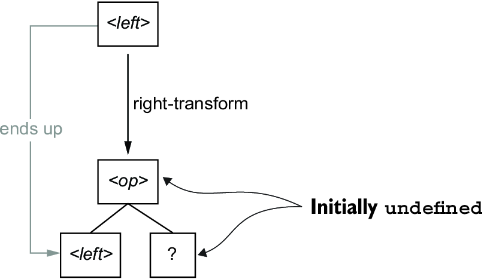
Use the AST diagram to follow how an existing expression becomes “<left><op> ?” and how the original node becomes the left operand. section 12.4
