Boolean indexing, also called mask indexing, filters a pandas Series or DataFrame with a same-shaped sequence of True and False values. Think of the Boolean values as a sieve: True keeps the corresponding item, while False leaves it out. A mask selects data; it does not transform the selected values. section 1.13
In practice, write the condition inside .loc. pandas evaluates that condition first, producing a Boolean Series, then uses it to select matching rows. For a Series, `s.loc[s < 30]` returns only values below 30. A condition can also compare values with a calculated result, such as `s.loc[s <= s.mean()]`. section 1.13
Find products selling above average
Start with the question, then make the condition describe the rows you want. `df['sales'] > df['sales'].mean()` produces one Boolean value per row. Pass it as the first argument to `.loc`; pass desired columns after the comma: `df.loc[df['sales'] > df['sales'].mean(), ['product_id', 'name']]` This separates row filtering from column selection. section 2.14
For DataFrames, `.loc[row_mask, column_selector]` makes the two axes explicit. The mask before the comma chooses rows; a second Boolean mask after the comma can choose columns. The same pattern supports assignment: a scalar is broadcast to every match, while a list, array, or Series must match the selected shape. section 2.8
Count unusual taxi rides
Filter before aggregating to answer a focused question. To count rides with more than eight passengers, select the matching `passenger_count` values and call `count()`: `df.loc[df['passenger_count'] > 8, 'passenger_count'].count()` Combine conditions with `&`, keeping each comparison in parentheses: `(df['payment_type'] == 2) & (df['total_amount'] > 1000)`. section 3.2
Masks are especially useful when a condition can match more than one row. To find every minimum or maximum closing value, compare the column against its aggregate: `df.loc[df['value'] == df['value'].min(), ['date', 'value']]`. This retains ties rather than assuming one location. section 3.17 section 1.15
Use Boolean indexing in cleaning pipelines, too. A string test such as `df['age'].str.isdigit()` identifies rows whose values contain only digits, allowing those rows to be retained before conversion. After numeric conversion, a range condition such as `df.loc[df['age'] < 120]` removes implausible values. section 5.5 section 5.6
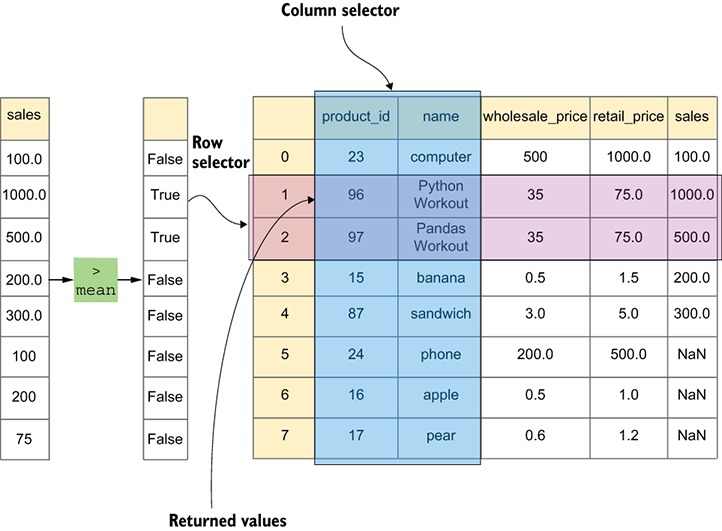
This diagram makes the two parts of `.loc` visible: the Boolean row condition filters records, and the column list narrows the returned fields. section 2.14

