The CSS box-shadow property adds one or more shadows around an element’s box, creating depth, softness, inset shading, or crisp decorative edges. section 13.2 section 13.0
Build a shadow by choosing its position, size, softness, and placement:
- Specify the horizontal offset, vertical offset, and color. The offsets follow Cartesian x, y order, so the first measurement moves the shadow horizontally and the second vertically. section 13.2 section 1.4.2
- Add an optional blur radius to soften the edges and an optional spread radius to enlarge or reduce the shadow. section 13.2
- Prefix a shadow with inset to render it inside the element; separate multiple shadows with commas. section 13.2.1
- Match the element’s border radius automatically, including when a crisp shadow is used as a curved, border-like edge. section 13.2 section 13.2.3
A button that changes when pressed
Use a soft outer shadow for the resting button, then replace it with layered inset shadows in the :active state: .button { box-shadow: 0.1em 0.1em 0.5em oklch(26% 0.07 263deg); } .button:active { box-shadow: inset 0 0 0.5em oklch(26% 0.07 263deg), inset 0 0.5em 1em rgb(0 0 0 / 0.4); } The first state lifts the button visually; the second makes it appear depressed. section 13.2.1
Figure 13.12 Box shadow syntax
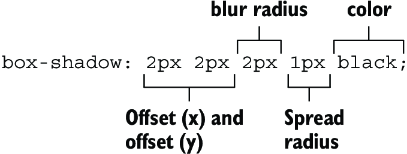
Inspect the syntax diagram to compare offsets, color, blur, spread, and inset placement. section 13.2
Listing 13.13 Modern button styles
.button {
  padding: 0.8em;
  border: 0;
  border-radius: 0.5em;           #1
  font-family: Helvetica, Arial, sans-serif;
  color: white;
  background-color: oklch(57% 0.11 263deg);
  box-shadow: 0 0.4em oklch(40% 0.13 263deg);     #2
  text-shadow: 1px 1px oklch(40% 0.13 263deg);     #3
}
.button:active {
  background-color: oklch(53% 0.13 263deg);
  transform: translateY(0.1em);              #4
  box-shadow: 0 0.3em oklch(40% 0.13 263deg);    #5
}
Inspect a crisp shadow used as a thick lower edge, then compare the active-state transform and reduced shadow offset. section 13.2.3


