liveBook · Manning

Weakness walkthrough

As explained in "Looks Good to Me"

A collaborative review of a process workflow in which each identified weakness is discussed and replaced with an agreed-upon solution.

A weakness walkthrough turns a team’s actual code review workflow into an agreed process. The team proceeds collaboratively, stopping at each identified weakness to discuss why it matters and define the ideal state. section 9.2.1

Run the walkthrough in sequence:

  • Condense duplicate comments into distinct workflow weaknesses, while preserving supplemental detail. section 9.2.1
  • Mark remaining comments that are distinct enough to stand alone as weaknesses. section 9.2.1
  • Stop at each weakness, discuss its cause and ideal state, and choose whether to remove, shorten, or enforce the step. section 9.2.1
  • Replace the weakness with the agreed solution before continuing to the next workflow step. section 9.2.1
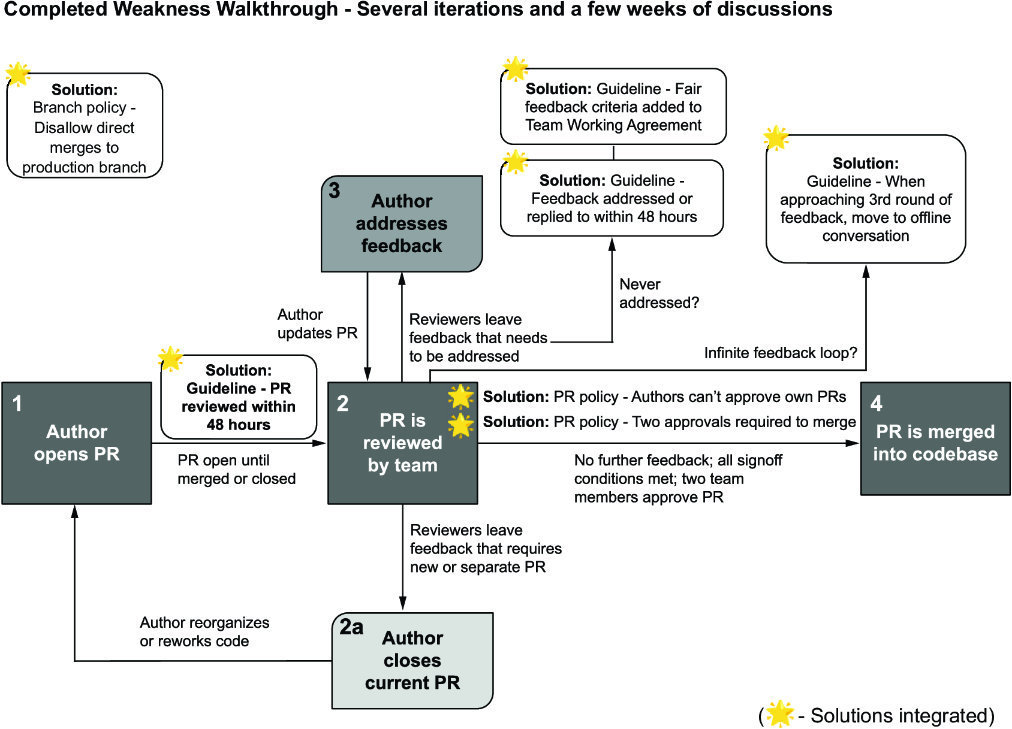
Figure 9.7 Final workflow, all weaknesses accounted for
figure

Use the final workflow view to verify that every identified weakness has an agreed solution. section 9.2.1

How "Looks Good to Me" covers it

How deep it goes
Guides comment consolidation, weakness-by-weakness discussion, solution replacement, and iterative reassessment.
Examples
Uses baseline and real workflow annotations, consolidated weakness comments, solution discussions, and a finalized workflow.
What it assumes
Assumes an existing workflow that a team can annotate, while teaching how to expose and resolve its weaknesses.
What you can do after
Evaluate and improve a team’s code review workflow through explicit, co-created decisions.
How it connects
Connects code review processes with workflow weaknesses, enforcement, ideal states, and agreed-upon solutions.

Related concepts

This explainer was generated by Manning's knowledge graph from the text of "Looks Good to Me". The section links point to the parts of the book it draws on.