Breadcrumbs show users where they are within a website’s hierarchy and help them trace their route back to higher-level pages. They become especially useful when the main menu stops at top-level destinations while content continues through several deeper levels. section 5.1.1
Use breadcrumbs when:
- A dropdown or landing page leads users two or more levels below the main navigation. section 5.1.1
- Users need to understand how the current page relates to other pages and content. section 5.1.1
- The site needs a way back to higher levels beyond what the main menu exposes. section 5.1.1
A deeper website section
A user opens a top-level menu, selects a second-level landing page, and then enters content three or four levels deep. A secondary navigation area can provide breadcrumbs that show the route and support movement back up the hierarchy. section 5.1.1
Figure 5.4 The navigation on this website extends deeper, beyond what’s available in the header navigation. The sidebar on the right serves as navigation to the site’s deeper levels and as a wayfinding tool to let the user know where they clicked from.
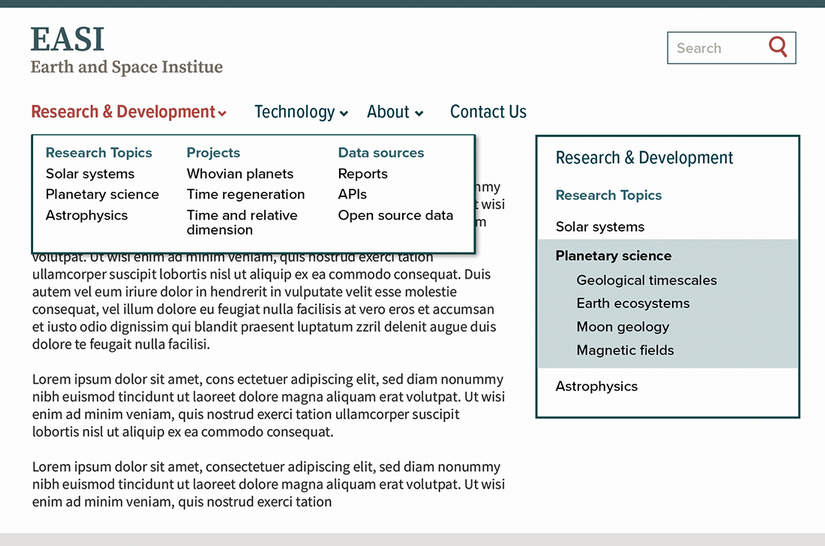
Examine the deeper-navigation example, where a sidebar supports both movement through lower levels and orientation about the user’s path. section 5.1.1
