A browser repaint redraws pixels after the document or styles change. It can accompany DOM updates and reflow, consuming resources when changes affect the rendered page. section 1.3.2
Use repaint behavior to understand whether an interface update is narrowly targeted:
- The browser may repaint areas that moved or changed, even when the framework made no corresponding DOM patch. section 8.4.2
- A poorly optimized TODO application repaints the entire page whenever a character is typed. section 8.4.2
- A more selective implementation repaints only the input text and its label during the same interaction. section 8.4.2
Watching a typed character
Enable Chrome DevTools' paint flashing in the Rendering tab, then type in a TODO input. Green rectangles reveal the pixels the browser repaints. Compare this with the DOM changes reported by the Elements tab and the framework's patchDOM() function. section 8.4.2
Figure 8.21 With the new version of your framework, only the input field’s text and the field’s label are repainted when you type a character in the input field.
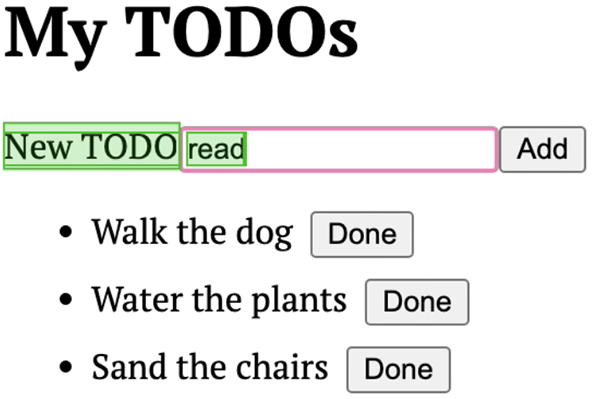
Shows the selective repaint pattern: typing repaints only the input field's text and its label. section 8.4.2
