1. Mistake: treating BULK_LOGGED as a permanent replacement for FULL. It is a temporary SQL Server recovery configuration for heavy bulk work: selected operations are minimally logged, reducing log usage and transaction-log I/O, but point-in-time recovery is unavailable. section 9.4 section 12.6
Use the configuration cautiously:
- Switch from FULL to BULK_LOGGED immediately before a known heavy ETL or bulk-insert operation. section 9.4 section 12.6
- Switch back to FULL when the operation ends and take a transaction-log backup. section 9.4
- Do not promise recovery to a time inside the bulk-logged interval; restoration reaches only the end of the relevant log backup. section 9.4 section 12.6
MarketingArchive nightly load
Before the warehouse ETL begins, configure the database with: ALTER DATABASE MarketingArchive SET RECOVERY BULK_LOGGED WITH NO_WAIT; After the bulk load, restore FULL recovery and take a transaction-log backup. This reduces pressure on the log volume while preserving the normal recovery arrangement outside the load window. section 9.4
Listing 9.10 Setting the database recovery model to bulk logged
ALTER DATABASE MarketingArchive SET RECOVERY BULK_LOGGED WITH NO_WAIT ;
Open the executable ALTER DATABASE statement for setting BULK_LOGGED recovery. section 9.4
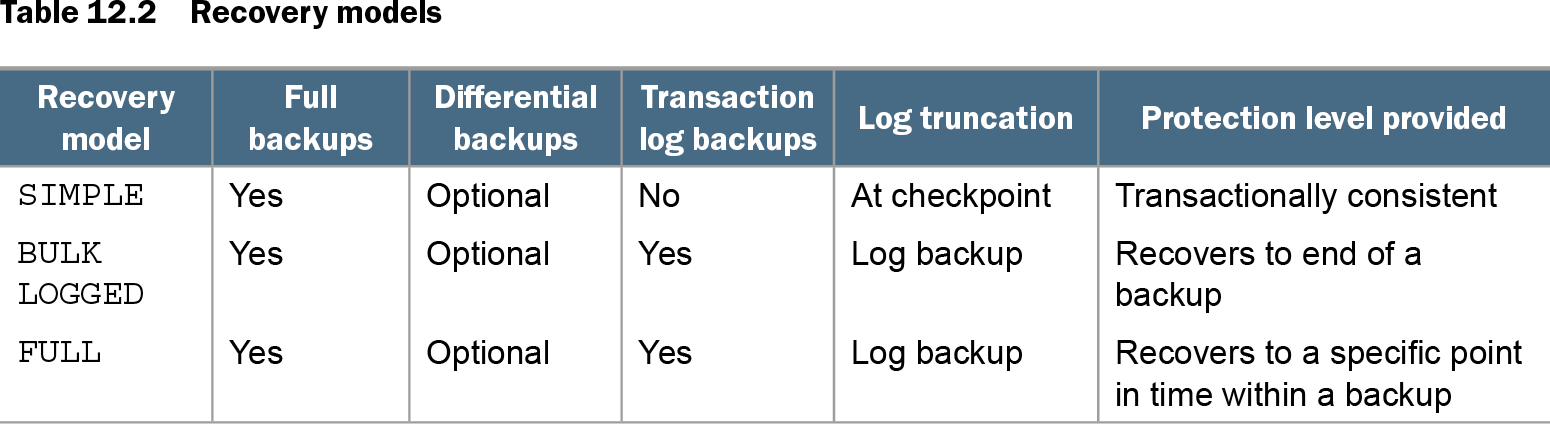
Table 12.2 Recovery models (view table figure)
| Recovery model |
Full backups |
Differential backups |
Transaction log backups |
Log truncation |
Protection level provided |
|---|---|---|---|---|---|
| SIMPLE |
Yes |
Optional |
No |
At checkpoint |
Transactionally consistent |
| BULK LOGGED |
Yes |
Optional |
Yes |
Log backup |
Recovers to end of a backup |
| FULL |
Yes |
Optional |
Yes |
Log backup |
Recovers to a specific point in time within a backup |
Compare BULK_LOGGED with SIMPLE and FULL by backup requirements, log truncation, and recovery protection. section 12.6