Business logic contains the application’s task-specific rules—the “smarts” that turn user choices and input into useful outcomes. It connects the presentation layer, which communicates with users, to the persistence layer, which stores data. section 6.3 section 10.3
A clean design keeps business logic separate from menus, screens, and database details. This separation lets each layer evolve independently and makes the application easier to maintain. section 6.3 section 6.4
In a bookmark application, business logic appears as commands with a consistent execute operation:
- Create the bookmarks table by asking the persistence layer to create the required fields. section 6.3.2
- Add a bookmark by supplying a timestamp when needed, storing the data, and reporting the result. section 6.3.2
- List bookmarks by selecting records with a configurable ordering. section 6.3.2
- Delete a bookmark by passing its identifier to the persistence layer. section 6.3.2
A command mediates an application action
class AddBookmarkCommand: def execute(self, data): data['date_added'] = datetime.utcnow().isoformat() db.add('bookmarks', data) return 'Bookmark added!' The command owns the action’s behavior while the presentation layer only needs to trigger execute. A later refinement returns a status and result, allowing presentation code to control user-facing messages. section 6.3.2 section 10.4.1
The command pattern reduces coupling between presentation and business logic: menu options invoke commands without knowing their internal work, while commands need only the data they receive. Interfaces can also reduce coupling to persistence details. section 6.3.2 section 10.3 section 10.4.1
Figure 6.7. The business logic layer determines when and how data is read from or written to the persistence layer.
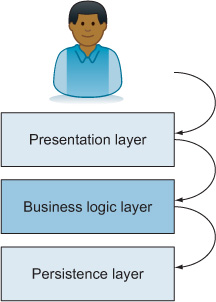
Use the layer diagram to trace how business logic decides when and how data moves between presentation and persistence. section 6.3.2









