A calendar view arranges dashboard information by date, making time-based activity easier to scan than a crowded collection of charts. In a housekeeping dashboard, it shows stayovers, check-ins, and checkouts across nights. section 8.3.3
Use a calendar view when:
- Dates are the natural organizing structure for the information. section 8.3.3
- Many daily metrics would make separate bar charts feel overcrowded or busy. section 8.3.3
- Small symbols can communicate related status details, such as whether a night is fully or almost fully booked. section 8.3.3
A housekeeping dashboard
A calendar view displays stayovers, check-ins, and checkouts by night, while a line chart handles adults and children by room type. This division keeps the dashboard useful without turning it into a wall of graphs. section 8.3.3
Figure 8.6 Sure enough in a surprise to no one, a zillion bar graphs (on the left) are overwhelming and busy. Mariette and I decided to go with the concept on the right instead, with a calendar view showing stayovers, check-ins, and checkouts (with symbols to indicate whether a night was fully or almost fully booked), and a line chart showing adults and children by room type (legends to be decided later).
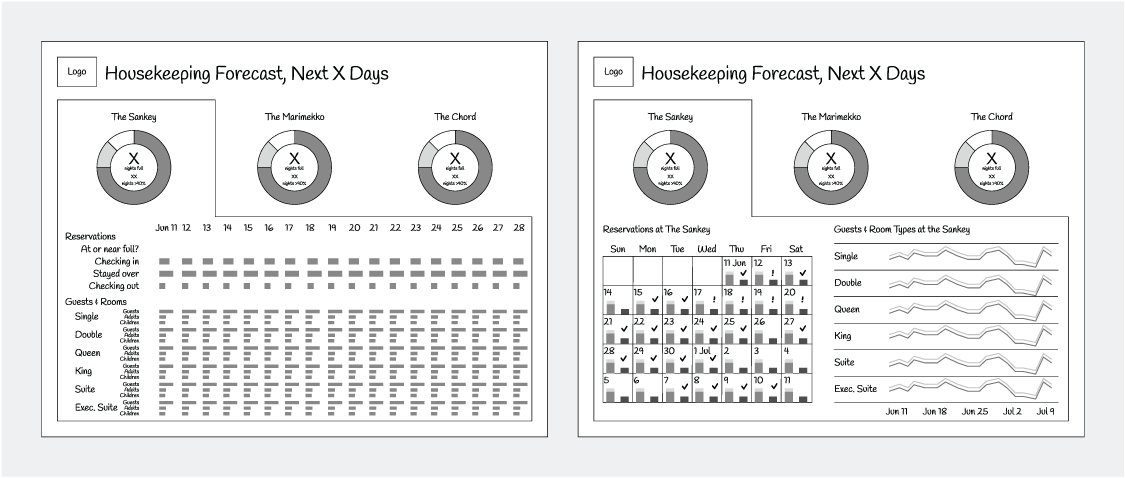
Compare the rejected layout of numerous bar graphs with the selected calendar view, which combines booking events and occupancy symbols with a separate line chart. section 8.3.3
