Cargo is Rust’s package manager and build tool. It provides the usual interface to the compiler, the crates.io registry, and project commands; using rustc without Cargo is possible, but rarely the practical default. section 1.1 section 2.0
Start with the command that matches the job:
- Run cargo new NAME for an application or cargo new NAME --lib for a library. Cargo creates Cargo.toml and an entry point at src/main.rs or src/lib.rs, respectively. section 2.1.2
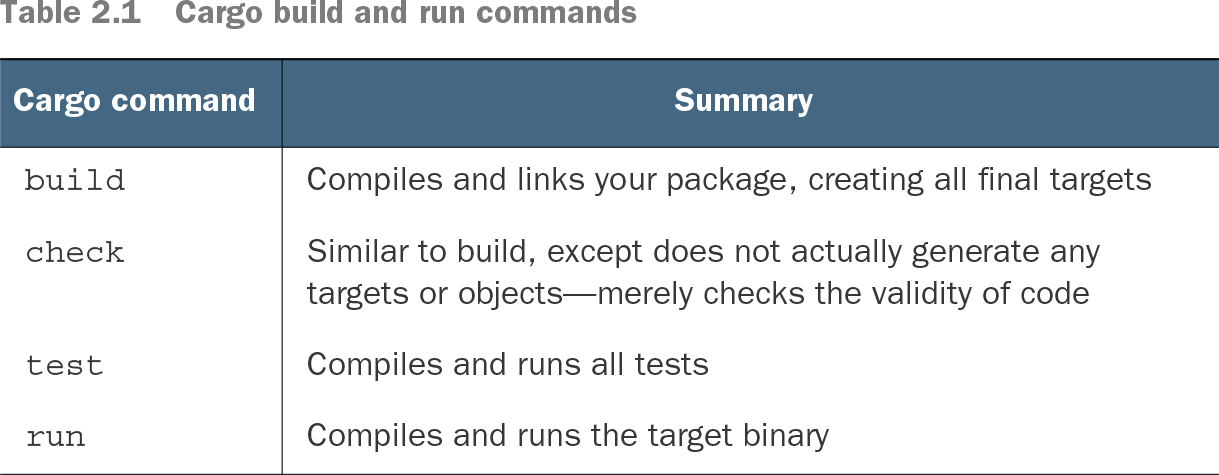
- Use cargo check during rapid edits: it validates code without producing final targets. Use cargo build to compile and link, cargo run to compile and execute, and cargo test to compile and run tests. section 2.1.3
- Declare crates under [dependencies] in Cargo.toml or use cargo add. Use cargo update to refresh Cargo.lock within the declared version requirements. section 2.2
Add a dependency
A manifest entry of [dependencies] followed by rand = "0.8" requests a compatible 0.8 release. Cargo uses caret requirements by default when no operator is supplied. An exact requirement such as =0.8.0 pins a version; avoid unnecessary pins in libraries when downstream packages may need different versions. section 2.2
Table 2.1 Cargo build and run commands (view table figure)
| Similar to build, except does not actually generate any targets or objects—merely checks the validity of code |
|
Compare build, check, test, and run by whether each produces targets or executes code. Prefer check when final output is not yet needed: its time savings can accumulate across repeated edits, though a single measured build showed only a modest difference. section 2.1.3
Cargo also supports project publication, documentation generation with cargo doc, and automated build, test, and publish steps in CI/CD. Modules and workspaces help organize larger projects. For compiler caching, an optional setup installs sccache with cargo install and selects it through RUSTC_WRAPPER before building. section 2.13 section 3.5.1