A centering force moves a whole cluster of nodes toward a chosen coordinate. In D3, d3.forceCenter() translates the particle system as one unit, preserving its overall shape rather than pulling each node independently toward a target. section 12.4.1 section 12.5
Use it when a simulated group needs to sit at a particular location in the visualization without being flattened or reshaped by separate horizontal and vertical positioning forces. Set the destination with the force’s x() and y() accessors. section 12.4.1
Centering differs from related forces in a simulation:
- Positioning forces, d3.forceX() and d3.forceY(), move nodes individually toward horizontal or vertical positions; together they can flatten a group. section 12.4.1
- Collision force, d3.forceCollide(), sets minimum distances between nodes to prevent overlap. section 12.4.1
- Many-body force changes node-to-node interaction, using negative strength for repulsion and positive strength for attraction. section 12.4.1
Recentering a simulated cluster
Start with nodes arranged by collision force. Their default cluster is around (0,0). Add d3.forceCenter() and provide x() and y() coordinates to shift the complete cluster to the desired location while retaining the arrangement produced by the other forces. section 12.4.1
Figure 12.16 The centering force moves an entire system of particles, or nodes, toward the coordinates passed to the x() and y() accessor functions.
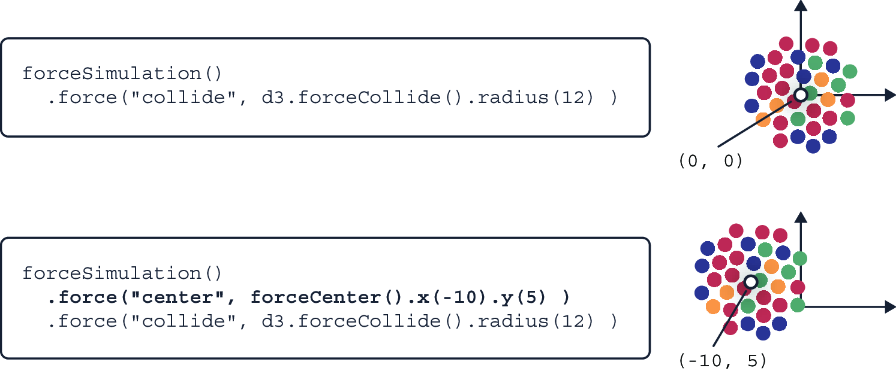
The figure contrasts a system’s existing shape with its translated destination: every node moves with the cluster toward the x() and y() coordinates. section 12.4.1
