A certificate store is an operating-system or application repository for digital certificates and trust information. Registering a development certificate there lets browsers recognize local HTTPS connections as trusted instead of showing security warnings. section 28.2 section 28.3
Certificate-store behavior varies with the platform and application:
- Windows and macOS can register the ASP.NET Core development certificate in the operating system store. section 28.2
- Linux software may use separate certificate stores, requiring direct configuration in a browser or application. section 28.2
- Kestrel can load a production HTTPS certificate from the OS store instead of a .pfx file. section 28.3
Trust a local development certificate
Run `dotnet dev-certs https --trust` to register the ASP.NET Core development certificate in the operating-system certificate store. Restarting the browser may be necessary before cached warnings disappear. section 28.2
Figure 28.4 The developer certificate is not trusted by default, so apps serving HTTPS traffic using it will be marked as insecure by browsers. Although you can bypass the warnings if necessary, you should instead update the certificate to be trusted.
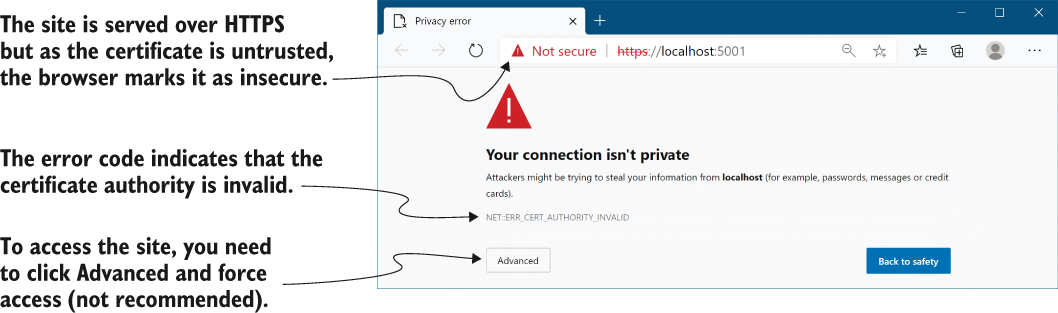
Use the illustration to distinguish an untrusted development certificate from a trusted HTTPS connection. section 28.2
