Certificate validation determines whether an X.509 certificate can be trusted for a connection. It checks that the certificate has not been tampered with, identifies the intended owner, confirms its validity period, verifies the issuing authority, and follows a trusted chain. Without these checks, an attacker could replace a server’s public key during an insecure key exchange and intercept the connection. section 8.0 section 8.4
A validation decision commonly considers:
- The Subject identifies who owns the public key, while the SAN extension identifies valid network addresses such as DNS names, email addresses, IP addresses, or URIs. section 8.4
- The Issuer identifies the certificate authority, and the certificate’s signature must be verifiable through a trusted CA hierarchy. section 8.2 section 8.4
- The current time must fall within the certificate’s Validity range. section 8.4
- A certificate may still be unacceptable when its private key was compromised or the certificate was revoked; CRLs record certificates that should no longer be trusted. section 8.4
Local HTTPS without disabling validation
A developer using a self-signed certificate may encounter validation errors and be tempted to pass options that ignore them or to disable validation in application code. That workaround can reach production and create a security breach. A safer local-development pattern creates a personal CA, installs it on the laptop, and issues local certificates from it, preserving normal validation. section 9.2
Figure 8.1 Public keys are exchanged over an insecure connection and can be modified by a man-in-the-middle attacker. The client needs a way to validate that the public key it received from the server hasn’t been tampered with. By using an X.509 digital certificate, the client can determine who the public key belongs to.
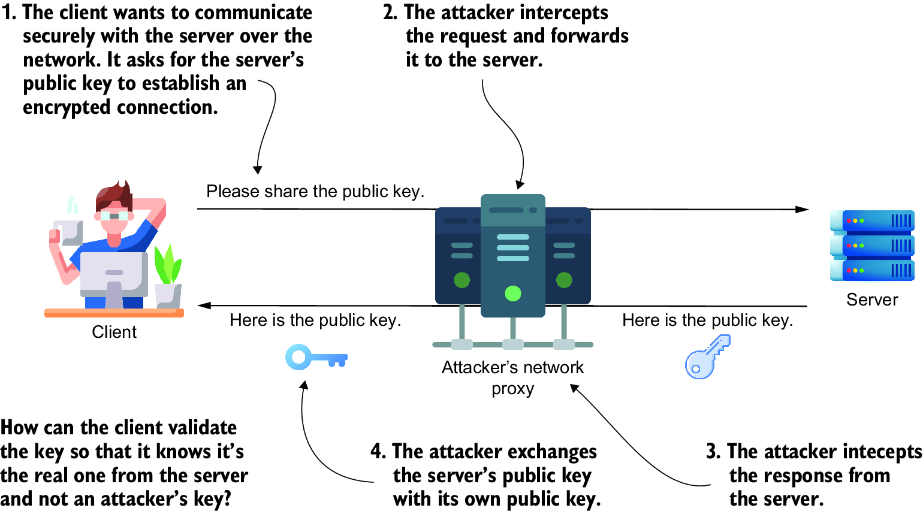
Use the trust-boundary diagram to see how an attacker can replace a public key and how an X.509 certificate helps the client validate its ownership. section 8.0
Figure 9.1 The certificate life cycle. This figure walks you through the four main steps of getting a valid digital certificate: generating a key pair, creating a CSR, having it validated by a CA, and receiving the issued certificate.
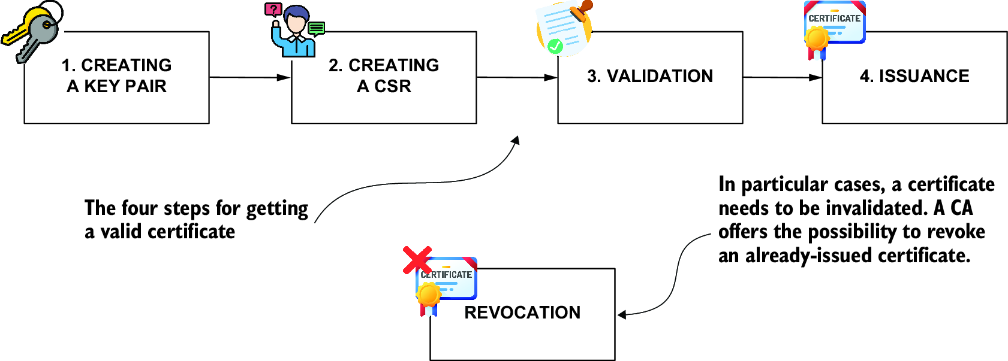
Use the lifecycle diagram to connect key-pair creation, CSR submission, CA validation, certificate issuance, and later revocation. section 9.1
