Chartjunk is extraneous decoration in a chart: visual material that does not carry the data or help deliver its message. It can dilute attention, distract from the point, and make a chart feel less credible. That does not make every decorative choice forbidden; it makes decoration something that must earn its place. section 6.1.1
A useful test is subtraction. Start by removing the defaults: gridlines, excess color, point labels, axis lines, ticks, labels, and titles. Keep the data, then add each element back only when it helps someone read the chart. This is less a ban on visual personality than a request for good housekeeping. section 6.1.1
Elements may be unnecessary when another choice already does their job:
- Axis titles can be redundant when a clear chart title establishes the measure and context. section 6.1.1
- Direct labels can replace an axis when readers need exact values at the marks themselves. section 6.1.1
- Extra color can compete with the data, so a restrained palette—or even a black-and-white check—helps reveal whether color is doing useful work. section 6.1.1
- Awkward labels can demand physical effort from readers; changing the chart orientation may make them easier to scan. section 6.1.1
Let the data receive the label
A bar chart can lose its axes and axis titles when it has a good title and labels placed directly at bar ends. That placement follows the reader’s gaze: the eye is already looking at the end of each bar, so the value is waiting where it is needed. section 6.1.1
Whimsy can be a deliberate exception. An iconograph made from cheerful produce icons is arguably chartjunk, and it is less exact when each icon represents multiple units. Yet it can still communicate relative sales clearly when typography stays simple, the remaining display is data-focused, and labels supply exact values. Consider audience and purpose: a playful personal project and a business presentation may need different levels of restraint. section 6.2.2
Figure 6.6 Even though the chart on the left is already pretty simple, we simplified it even further by removing the axes and axis titles, instead opting to give the chart a good title and labeling the bars directly. The user’s eyes are already on the right, looking at the end of the bar, so placing a label there makes sense.
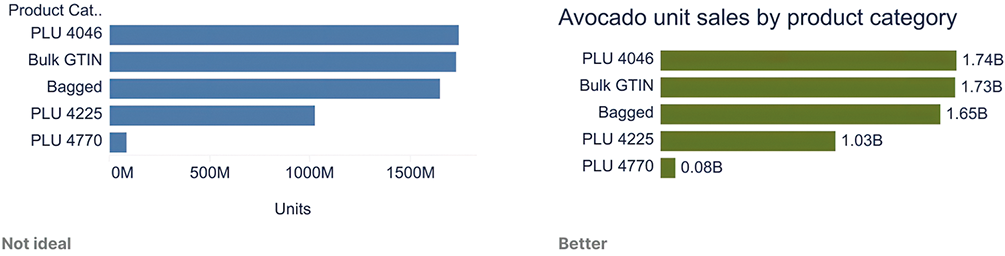
Compare a conventional bar chart with a leaner version that replaces axes with a strong title and direct end labels. section 6.1.1
Figure 6.9 An iconograph showing fictitious produce sales, led by apples. (And how cute is that avocado! He was begging to be included, so who was I to tell him no?)
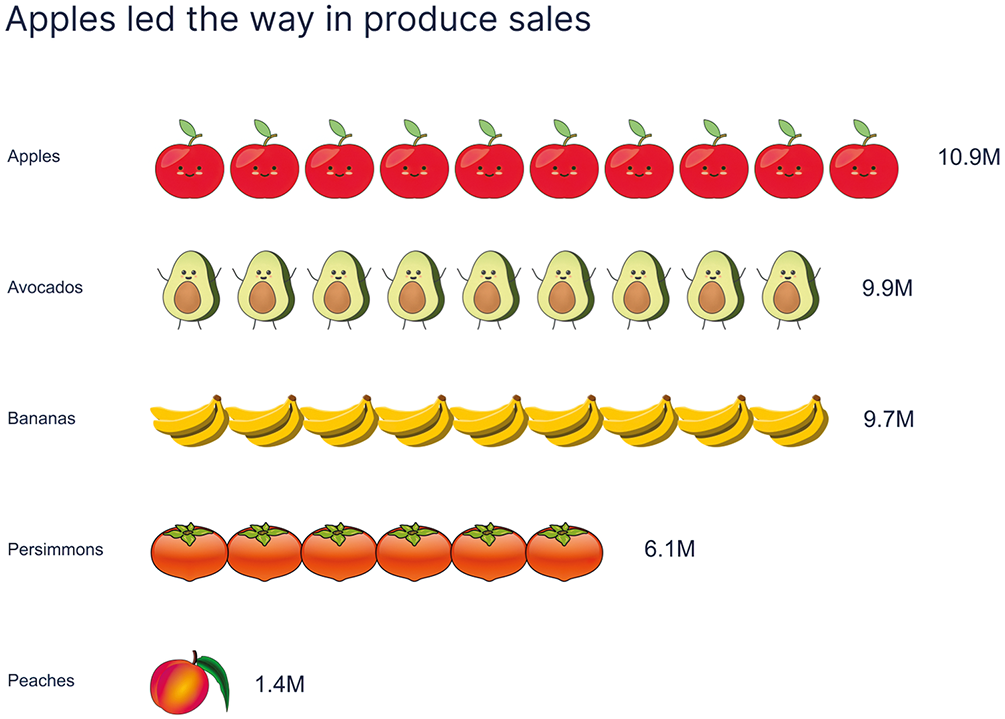
Use this iconograph to examine a cautious exception: decorative icons remain readable when exact totals are labeled. section 6.2.2
