A chat widget is an embeddable web interface for adding basic conversational interaction to a website. The widget connects to a deployed Langflow flow through Langflow APIs, so visitors can use the application without opening the development environment. section 8.3 section 8.5
A practical embedding workflow has four stages:
- Deploy the flow in an always-on environment rather than leaving it only on a local computer. section 8.5
- Open the sharing controls, choose the site-embedding option, and copy the generated HTML code. section 8.3
- Paste the snippet into a page’s raw HTML area; WordPress users can place it in a Custom HTML block before previewing and publishing. section 8.3
- Add the required Langflow API keys and optionally adjust colors, labels, or the welcome message with the configurator. section 8.3
Publishing HungryTraveler
After deploying the HungryTraveler flow, copy its generated embed code and paste it into a website or WordPress Custom HTML block. Visitors can then chat with the travel assistant from the page. A configurator can preview the widget and produce a styled snippet matching the site’s theme. section 8.3
Figure 8.25 You can embed the chat widget onto any web page by copying and pasting some HTML code.
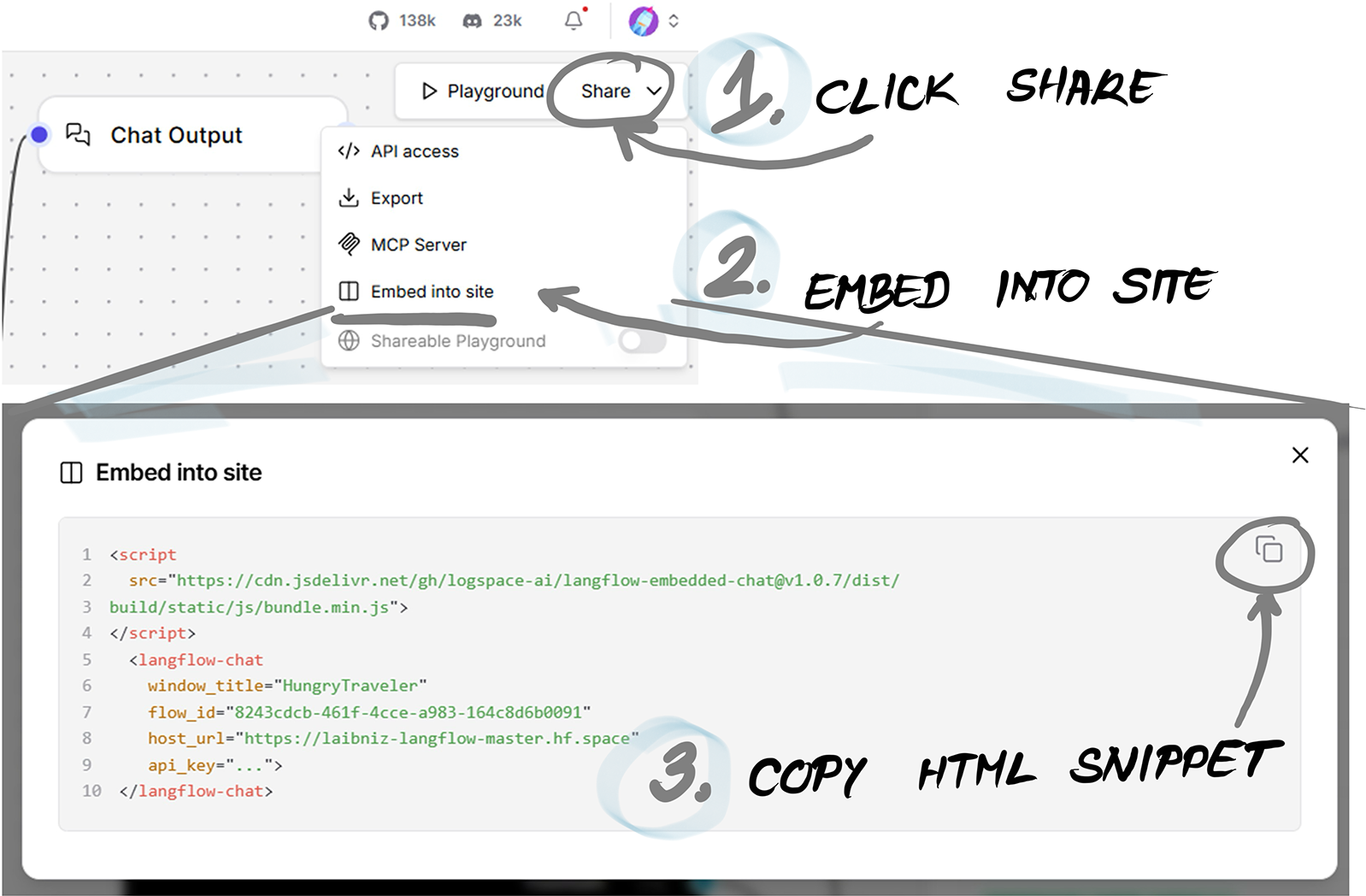
Use the embedding diagram to visualize the copy-and-paste relationship between the HTML snippet and the web page. section 8.3
