ChatPDF lets you upload a PDF and question it in a browser chat, much like a ChatGPT session. Its useful trick is giving conversational prompts access to the document instead of trying to squeeze a long file into one prompt. section 5.0 section 5.2
Start by dropping in a PDF, then ask focused questions: request a summary, identify important items, ask about a named page, or follow up when an answer needs context. Treat the exchange as a faster route into a document, not a substitute for reading the parts that matter. section 5.2 section 7.1
Figure 5.2 The request/response process using the ChatPDF API
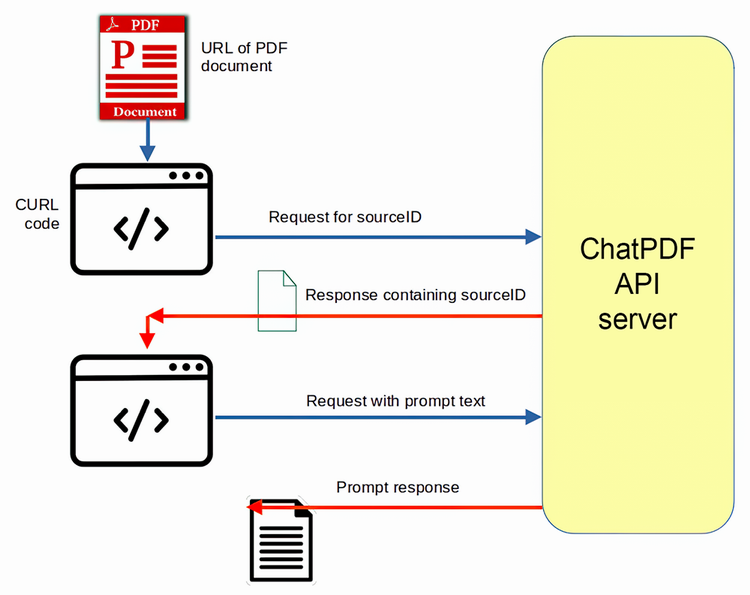
API use is a two-stage exchange: first submit a PDF URL and receive a source ID; then send messages that name that source ID. section 5.2
For repeatable PDF research, automate the same workflow:
- Request an API key, then submit a document URL with a POST request. section 5.2
- Send a prompt with the returned source ID; the API documentation includes Node.js, Python, and curl patterns. section 5.2
- Read topics from a file and generate a distinct, topic-specific prompt for each one when producing assessment questions or similar output. section 5.2
- Scale a research pipeline by downloading documents, converting them to PDFs, submitting them, and scoring or comparing the responses. section 7.1
Interrogating a long financial filing
A company Form 10-K can be converted to PDF, uploaded, and queried for investor-relevant items. Follow-up prompts can ask about resource-allocation risks, calculate or report ratios, and explain why those ratios matter. The answers provide leads for due diligence; a fuller assessment still requires deeper questioning and review. section 7.1
Turning a missed meeting into searchable notes
Transcribe a recorded business call with Whisper, export the transcript as a PDF, upload it, and request summaries for the topics you need. This turns a spoken-word recording into a document you can query directly. section 8.1
