A child page is a more specific webpage placed beneath a broader parent page. It keeps related information together without making one page long or crowding the main menu. Visitors usually reach child pages by hovering over a parent menu item and choosing from its drop-down submenu. section 3.3.1 section 3.3.5
Think of the parent page as the main topic and each child page as one useful part of that topic. For a fishing site, Lures can be the parent, with Crankbaits, Spinnerbaits, Topwater Lures, and Buzzbaits as child pages. About Us might contain child pages such as Our History and Future Plans. section 3.3.1
Plan child pages before adding content:
- List the topics visitors should find on the site. section 3.3.1
- Group related topics under a small number of broad parent pages. section 3.3.1
- Use child pages for subsidiary or supplemental information that expands the parent topic. section 3.3.5
- Keep the main menu brief—roughly five or six parent pages when possible—and use child pages to avoid an overloaded navigation bar. section 3.3.1 section 3.7
- Avoid grandchildren where possible, because deeper nesting can be difficult to navigate. section 3.3.1
Example: recipe sections
A recipe site can first create empty placeholder pages, then organize cuisine-related pages beneath a broader category. Placeholder pages need only a title at this stage; content can be added after the site structure is in place. For instance, titles such as Tex Mex Meals, Spicy Thai, Chinese Cuisine, French Fare, and Italian Ingredients can become child pages when their shared parent topic is chosen. section 3.6.1 section 1.6.3
Child pages improve navigation when they help visitors reach the information they want in few clicks. They also prevent a parent page from becoming a long wall of text. Give pages short, clear names, and do not repeat the site title in menu labels; visitors already know the site’s overall subject. section 3.3.5 section 3.7
A menu and a sitemap serve different jobs. The menu highlights the main parent categories and their child pages for everyday navigation. A sitemap can list every topic and subtopic, helping with a larger site’s detailed hierarchy. section 3.3.7
Figure 3.17 This is where you assign a child page to its parent. In effect, you create the parent/child page relationship here.
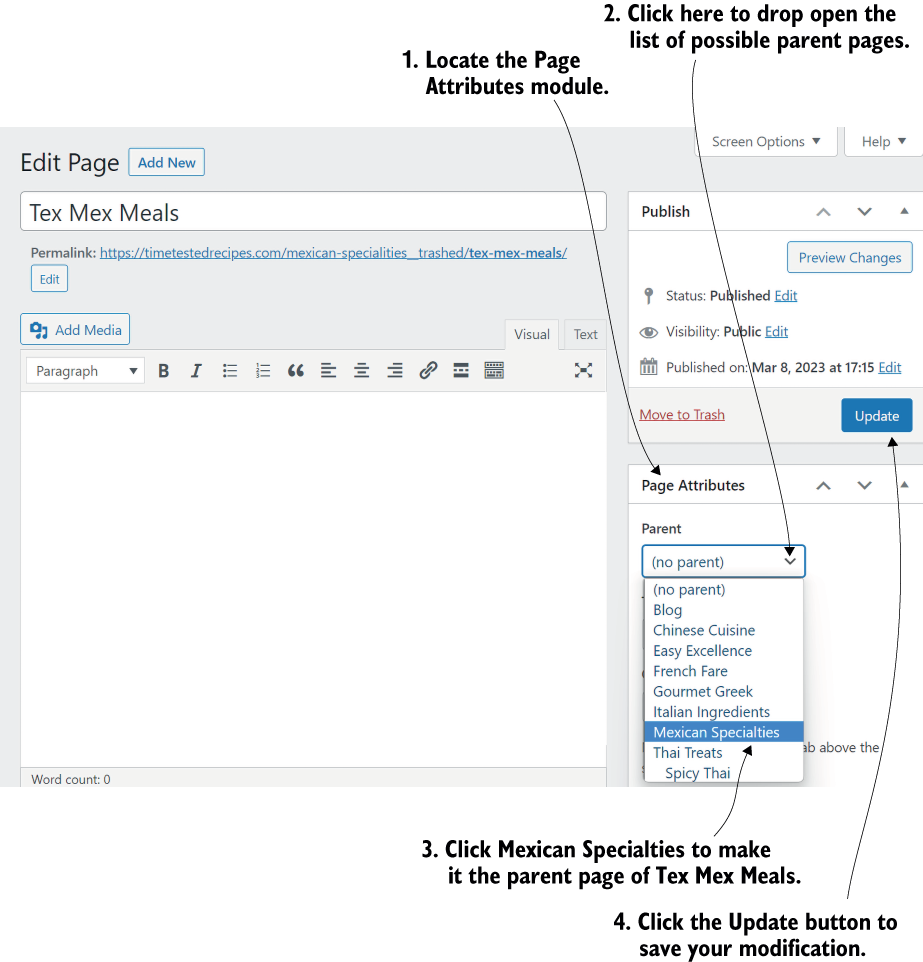
Use the parent-selection screen to place an existing page beneath its chosen parent, creating the parent/child relationship. section 3.6.1


