A clean image contains the original visual signal without diffusion noise. It is represented as x0, the time-step-zero starting point for forward diffusion, before noise produces progressively noisier images. section 1.3.1 section 5.1.1
Forward diffusion uses the clean image as the first stage in a controlled sequence:
- Start with x0 at time step 0. section 1.3.1
- Add small amounts of normally distributed noise at successive time steps, forming weighted combinations of the image and noise. section 5.1.1
- Continue until the image at T = 1,000 approximates pure random noise. section 1.3.1
- Use reverse diffusion to reconstruct a clean image from noisy inputs by repeatedly predicting and removing noise. section 5.2
Visualizing the signal being lost
A dog image serves as x0: it appears clean at time step 0, becomes partially obscured as noise increases, and ends as random noise. The same progression can be plotted for clean flower images at steps 0, 200, 400, 600, 800, and 1,000. section 1.3.1 section 7.2.2
Figure 1.6 In the forward diffusion process, we start with a clean image from the training set, x0, and add noise ε0 to it to form a noisy image x1, which is a weighted sum of x0 and ε0. We repeat this process for 1,000 time steps until the image x1,000 becomes random noise.
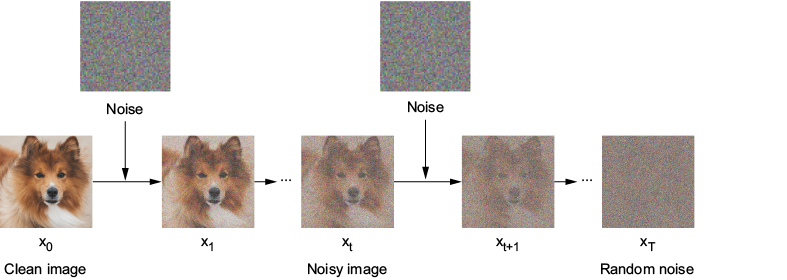
Trace the clean image x0 through 1,000 forward-diffusion steps until it becomes random noise. section 1.3.1
