A user flow maps the route someone takes to complete a task on a website or application. It starts at the task’s entry point, follows the screens and actions along the way, and ends when the goal is complete. A flow can cover one page or several. section 5.2.1
Start with a sitemap to understand the site’s structure, then map a particular task. A sitemap shows how pages are organized; a user flow asks what someone must do to reach a goal. A user journey map adds a different perspective: what a user persona thinks and feels during an experience. section 5.2 section 5.1.1
To turn a task into design decisions:
- Draw a flow chart with each screen and required action. Review the steps before adding layout or visual styling, so stakeholders can focus on the path rather than its appearance. section 5.2.1
- Look for steps that could be improved or removed. Use the chart to guide wireframes and prototypes, emphasizing the places users need to act. section 5.2.1
- Put mock-ups in front of customers and ask them to walk through the task. Note where they look, whether they find the primary call to action, and where they expect to go next. section 11.2.1
Figure 5.6 A simple user flow chart showing a login flow. Shapes can be used to represent different points a user may reach. Do they see a screen? Do they need to take an action?
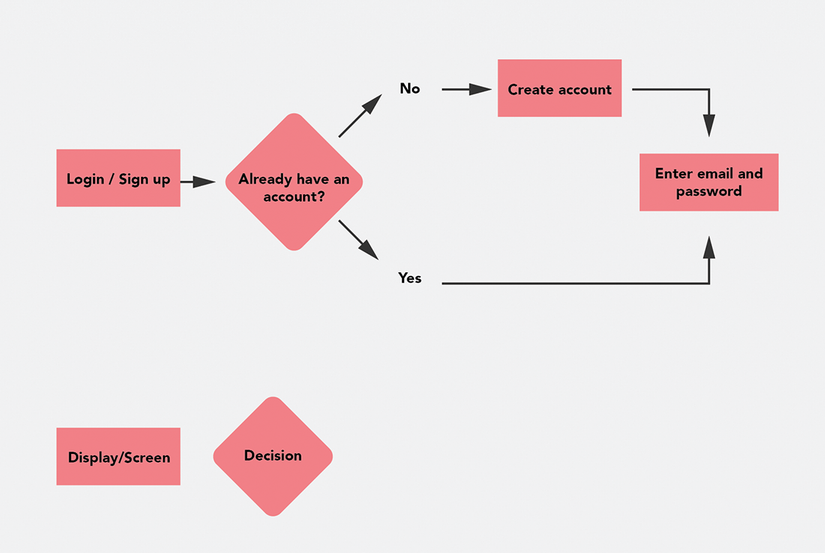
A login flow chart makes the sequence concrete: distinguish screens users see from actions they must take, without letting page layout distract from the task. section 5.2.1
A long mobile checkout form
Payment method, shipping address, and shipping options can become separate screens with clear Back and Forward buttons. Showing the steps makes the task feel more manageable and lets someone focus on a missing credit card number without facing every form error at once. section 6.5.1
A flow is useful before development, too. If completing a form requires data to be retrieved or stored, understanding that route helps developers anticipate backend work rather than wait for a design handoff. section 1.1.3