Client/server mode lets a Cisco router obtain time from an upstream NTP server while serving synchronized time to downstream clients. Configuring `ntp server ip-address` automatically gives the device both roles. section 2.3.2 section 2.4
Figure 2.4 R1, a client of two NTP servers, is an NTP server for clients of its own.
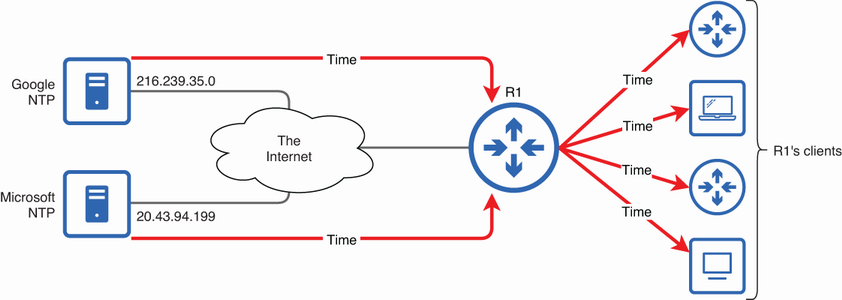
Shows the hierarchy in which R1 receives time from upstream NTP servers and supplies time to its own clients. section 2.3.2
Configure and verify client/server mode as follows:
- Configure an upstream source with `ntp server ip-address`; use `prefer` optionally to increase the likelihood of synchronizing to that source. section 2.4
- Provide downstream clients with a stable loopback address rather than an address tied to a physical interface. section 2.3.2
- Optionally configure `ntp source loopback0` so the router sources NTP messages from the loopback address. section 2.3.2
- Use `show ntp associations` to inspect time sources and `show ntp status` to verify synchronization and stratum. section 2.4
Downstream synchronization
After R2 uses `ntp server 172.16.1.1`, its associations show R1 as the selected source. If R1 is stratum 2, R2 becomes stratum 3 and can serve time to clients of its own. section 2.3.2
Figure 2.5 Using a loopback interface to provide a reliable NTP server address. The ntp source command specifies that R1 should source NTP messages from its Loopback0 interface.
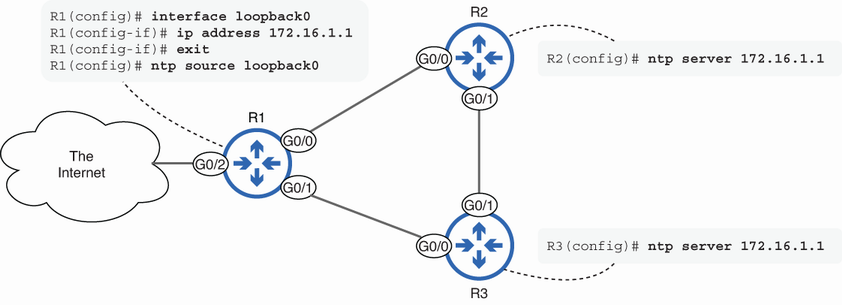
Illustrates how a loopback address keeps downstream NTP synchronization available when a physical interface fails. section 2.3.2
Client/server mode differs from server mode. `ntp master [stratum]` makes the device serve time from its own software clock without requiring an upstream NTP client relationship; the default local stratum is 8. section 2.4
