liveBook · Manning

Frontend

As explained in Spring Start Here, Second Edition

The client side is the part of an application that runs on a user's device and communicates with backend software.

The frontend is the part of a web app the user interacts with through a browser. It sends requests to the backend and receives responses. section 7.1.1

Figure 7.2 The big picture of a web app: The user interacts with the app through its frontend. The frontend communicates with the backend to execute logic at the user’s request and get the data to display. The backend executes business logic and sometimes persists data in a database or communicates with other external services.
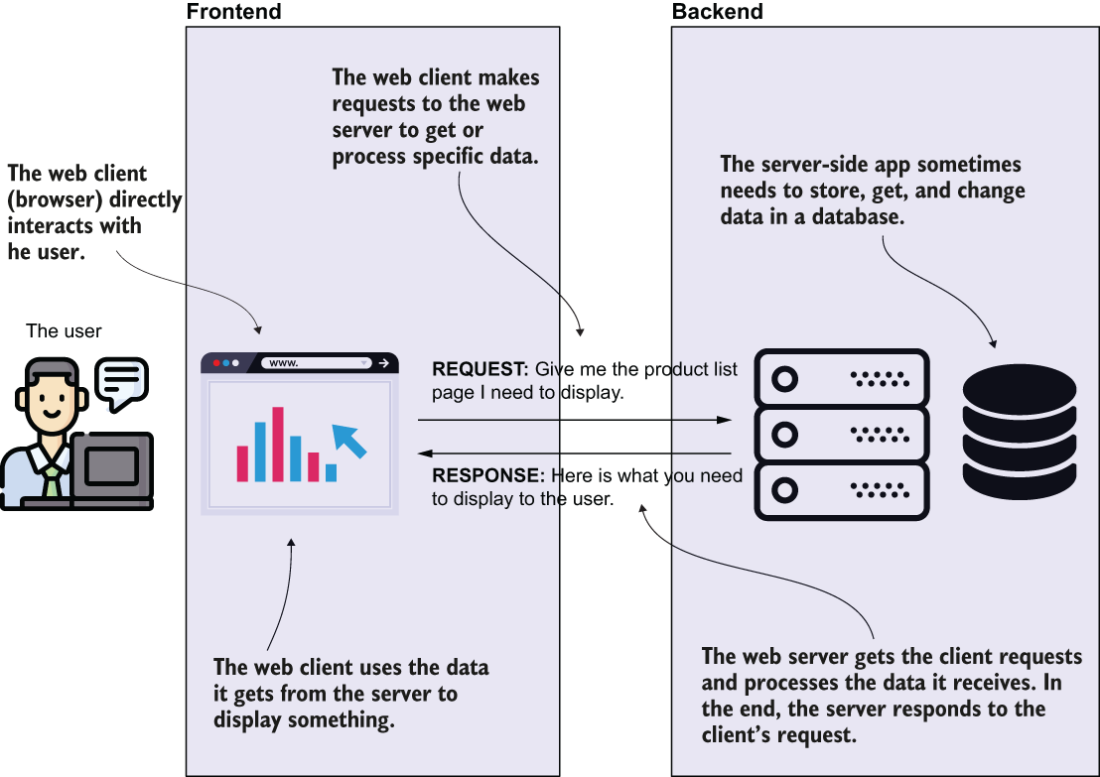
This diagram shows how user actions pass through the frontend to the backend, which handles logic and may store or retrieve data. section 7.1.1

A frontend can work with server responses in two ways:

  • The server prepares content such as HTML, CSS, and images for the browser to display. section 7.1.2
  • A separate frontend app processes raw data from the backend and decides what the browser displays. Angular, React, and Vue.js are examples of frontend technologies. section 7.1.2

How Spring Start Here, Second Edition covers it

How deep it goes
Distinguishes server-prepared pages from separate frontend apps that process raw data, without detailing frontend implementation.
Examples
Uses browser-displayed HTML, CSS, and images, plus raw JSON or XML data, to illustrate frontend interactions.
What you can do after
Understand how the frontend displays server-prepared content or processes raw data through a separate app.
How it connects
Connects web browsers and backends through requests and responses, and names Angular, React, and Vue.js as frontend technologies.

Related concepts

This explainer was generated by Manning's knowledge graph from the text of Spring Start Here, Second Edition. The section links point to the parts of the book it draws on.