Cloud Service Mesh, formerly Anthos Service Mesh (ASM), is Google’s managed, Istio-based service mesh. It gives teams a common way to secure, route, and observe communication among microservices without adding those functions to each application. In an Anthos deployment, it sits above Kubernetes as the service-management layer; available features vary across cloud, hybrid, multicloud, and edge configurations. section 4.0 section 4.4 section 1.2
Its main responsibilities are:
- Secure service-to-service traffic with mutual TLS (mTLS), certificates, and authentication and authorization policies. Mesh CA generates and rotates certificates. section 4.8 section 6.4
- Control traffic with routing, canary releases, A/B testing, circuit breakers, and fault injection. An Envoy sidecar can handle application traffic without code changes. section 4.8
- Collect service metrics and logs for Cloud Monitoring and Cloud Logging. Console views expose dependencies, request rates, errors, latency, and service health. section 5.1.5 section 6.4
Choose the topology before installation. On VPC-native GKE clusters in Google Cloud, multicluster traffic can travel between Pod IPs. In the described hybrid and multicloud design, each cluster’s control plane discovers services and endpoints across clusters, while cross-cluster traffic passes through an istio-ingressgateway. The control planes need access to the other clusters’ Kubernetes API servers. Distributed services can then appear as one logical service even when their endpoints run in different clusters. Check supported features and the current configuration profile for the chosen environment rather than assuming every topology behaves alike. section 10.3.1 section 10.3.2 section 4.4
Test on a GKE cluster
For an ASM 1.12 test installation, download the matching asmcli installer, make it executable, then run `./asmcli install --project_id PROJECT_ID --cluster_name CLUSTER_NAME --cluster_location CLUSTER_LOCATION --output_dir ./asm-downloads --enable_all`. Replace the three placeholders with your project and cluster details; this all-features command is a testing example, not a universal production profile. After installation, check that the `istio-system` Pods are running. Enable automatic sidecar injection on an application namespace with `kubectl label namespace NAMESPACE istio.io/rev=asm-managed --overwrite`, then restart its deployments with `kubectl rollout restart deployment -n NAMESPACE`. Injection occurs when Pods are created: `kubectl get pod -n NAMESPACE` should show two ready containers per instrumented workload. Confirm that the services appear in the console’s Service Mesh view. section 4.5 section 4.5.1 section 4.7.1
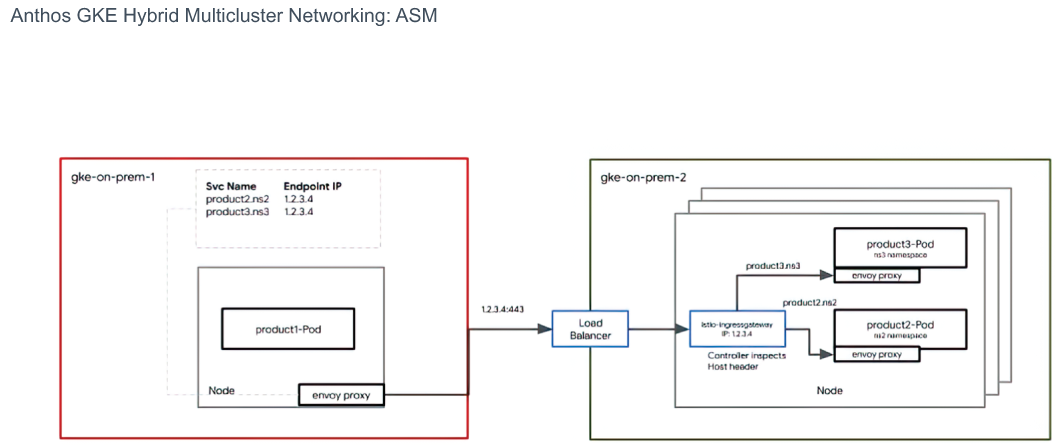
The hybrid multicluster diagram helps distinguish service discovery across clusters from the gateway path used to carry traffic between them. section 10.3.2
The mesh is optional: without it, load balancers or Ingress can provide connectivity, but service discovery must be configured separately, for example with DNS. For controlled outbound access, the mesh design can use an egress gateway, `REGISTRY_ONLY` outbound policy, and explicit `ServiceEntry` resources. Evaluate those choices alongside the networking requirements; installing a mesh does not remove the need to plan connectivity. section 10.4.2 section 10.4.3
