Cluster health status is Elasticsearch’s traffic-light view of shard availability. It answers a practical first question during operations: are primary shards and replicas assigned well enough for the cluster to serve data? Check it with `GET _cluster/health`; the response reports RED, YELLOW, or GREEN. section 3.2.4 section 15.3.1
Read the status from the assignment state of shards and replicas:
- RED means some shards are unassigned, so not all data is available for querying. This can occur transiently while a cluster starts, but in operations it requires immediate attention. section 3.2.4 section 15.3.1
- YELLOW means all shards are assigned and active, but replicas are unassigned. The cluster remains available, yet it has manageable risk and can become RED if the issue persists. section 3.2.4 section 15.3.1
- GREEN means every shard and replica is assigned and serving as expected; this is the desired steady state. section 3.2.4 section 15.3.1
Checking a growing virus-mutations cluster
Suppose a `virus_mutations` index uses three shards. When its first node starts, shard instantiation can leave the cluster RED. After another node joins, primary shards may be balanced while replicas remain unassigned, producing YELLOW. Once all shards and replicas are allocated, the status becomes GREEN. Use `GET _cluster/health` for structured cluster information, or `GET localhost:9200/_cat/health` for a compact text view that can be opened directly in a browser. section 3.2.4
Figure 3.11 Shards are balanced onto the new node, but replicas aren’t assigned yet (YELLOW status).
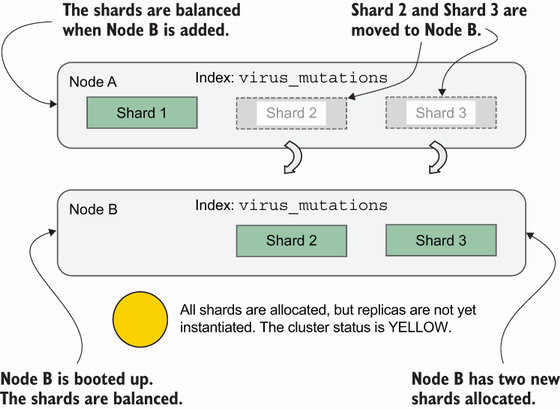
This allocation view makes YELLOW concrete: shards are balanced onto a new node, while replicas still lack assignment. section 3.2.4
Health status is a high-level signal, not a complete diagnosis. A RED cluster can follow hardware failures, network outages, filesystem corruption, or lost nodes. YELLOW can reflect lost nodes or unassigned shards and replicas. Investigate with cluster allocation and node APIs, and treat persistent YELLOW as an early warning rather than a healthy endpoint. section 15.0 section 15.3.1
Cluster health also relates to search and indexing performance. Sensible distribution of nodes, shards, and replicas, together with memory and hardware planning, supports a healthy cluster; poor architecture or maintenance can degrade performance and overall health. For production tuning, validate changes in a lab environment and seek expert guidance before changing settings. section 15.1 section 15.0
