AWS CodeDeploy automates application deployments to EC2 instances, Fargate, Lambda, and on-premises machines. For EC2, it can update applications in place: the instances keep running while an installed agent carries out the deployment. This is useful when replacing a machine would be slow or would disturb data stored on it. section 15.1
A deployment starts with a revision: a ZIP archive containing application code and deployment instructions. An engineer selects that revision and its target instances. The EC2 agent pulls tasks from CodeDeploy, downloads the archive from S3, runs its instructions, and reports status. section 15.1
Four terms organize a CodeDeploy rollout:
- Application: a name and compute platform. section 15.1
- Deployment group: the targets, such as an Auto Scaling group. section 15.1
- Revision: the code to deploy, referenced from S3 or GitHub. section 15.1
- Deployment: the rollout of one revision to a deployment group. section 15.1
Listing 15.2 The AppSpec file used to deploy Etherpad with the help of CodeDeploy
version: 0.0                            #1
os: linux                               #2
files:                                  #3
- source: .
  destination: /etherpad
hooks:                                  #4
  BeforeInstall:                        #5
  - location: hook_before_install.sh
    timeout: 60
  AfterInstall:                         #6
  - location: hook_after_install.sh
    timeout: 60
  ApplicationStart:                     #7
  - location: hook_application_start.sh
    timeout: 180
    runas: ec2-user
  ValidateService:                      #8
  - location: hook_validate_service.sh
    timeout: 300
    runas: ec2-user
The Etherpad AppSpec file shows where files are copied and which scripts run before installation, after installation, at application start, and during service validation. section 15.1
Deploy an Etherpad revision to EC2
Set up the web application's infrastructure with CloudFormation: an Application Load Balancer, an Auto Scaling group, and an RDS database instance. Define a CodeDeploy application and a deployment group targeting the Auto Scaling group. Then upload the Etherpad ZIP to the artifact bucket and create a deployment with `aws deploy create-deployment --application-name etherpad-codedeploy --deployment-group-name etherpad-codedeploy --revision "revisionType=S3,s3Location={bucket=$BucketName,key=etherpad-lite-1.8.17.zip,bundleType=zip}"`. Check progress with `aws deploy get-deployment --deployment-id $DeploymentId`. To release the next version, upload its ZIP and create another deployment referencing the new key. section 15.1
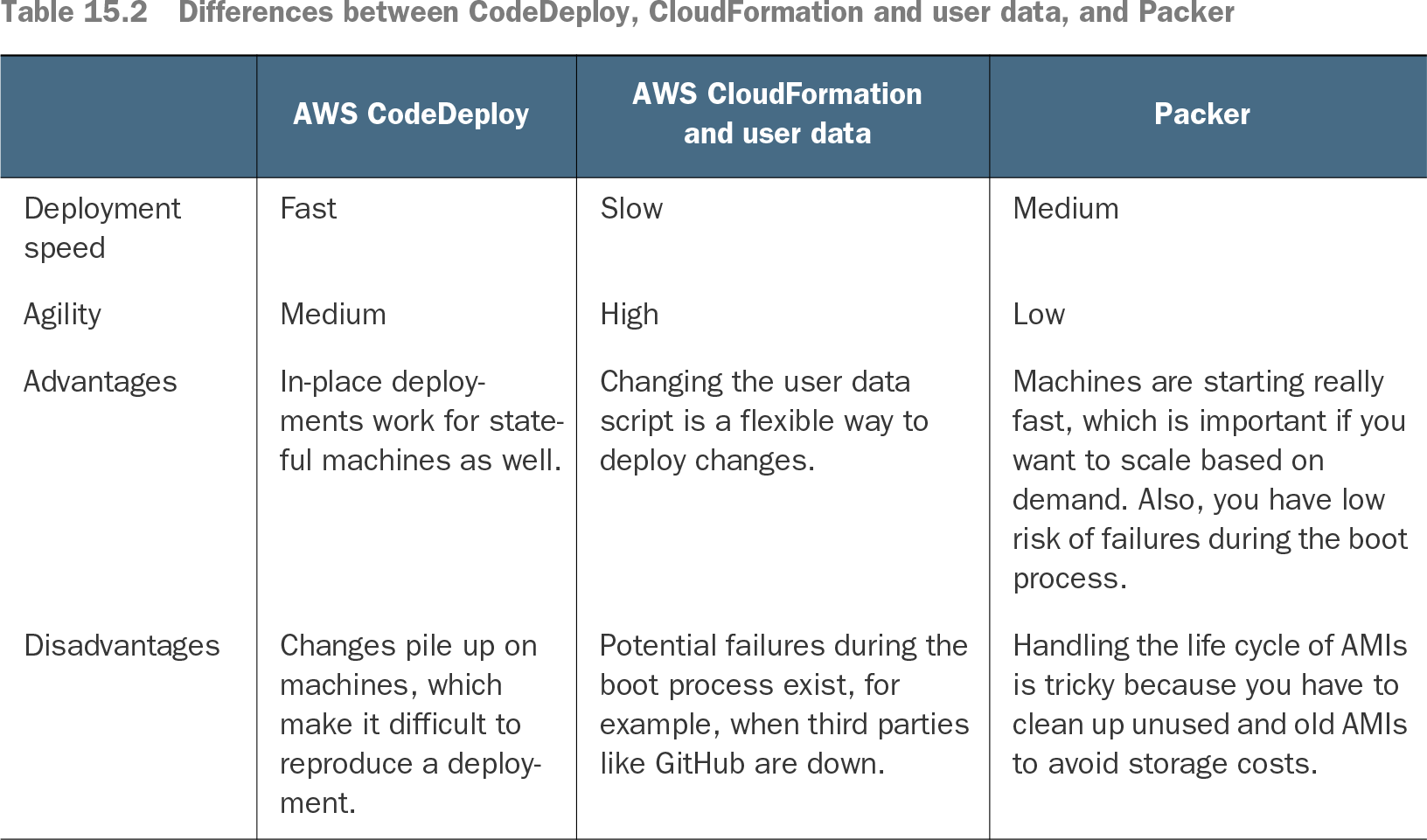
Choose a deployment configuration to control how many targets update together: all at once, half at a time, or one at a time. CodeDeploy's in-place approach is fast and accommodates stateful machines, but successive changes can accumulate on them and make a deployment difficult to reproduce. CloudFormation with user data instead launches new machines; Packer packages the application into an AMI for immutable servers. CodeDeploy is free for deployments to EC2, Fargate, and Lambda; on-premises machine updates cost $0.02 each. section 15.1 section 15.4
Table 15.2 Differences between CodeDeploy, CloudFormation and user data, and Packer (view table figure)
Compare CodeDeploy's speed and stateful-machine advantage with the flexibility of CloudFormation and user data and the immutable-server approach enabled by Packer. section 15.4