A color relationship describes how colors relate through the color wheel and through differences in hue, saturation, lightness, or position. These relationships help turn color selection from guesswork into practical palette decisions for websites and web apps. section 9.0 section 9.9
Common relationships provide starting points for building a balanced palette:
- Monochromatic palettes develop one hue through shades and tints. section 9.9
- Complementary, analogous, triad, and split-complementary palettes organize multiple hues through their positions on the color wheel. section 9.9
- Use a relationship as a starting point, then balance dominance and contrast so the interface guides attention without overwhelming users. section 9.2.2
Study an existing interface
Save a website design from Dribbble, place it in a design tool, and use the color picker to reconstruct its palette. Identify the color relationship, look for shades and tints, and estimate whether the colors follow a proportion such as 60:30:10 or 70:15:15. section 9.2.2
Figure 9.1 Adelson’s checker-shadow is an optical illusion where squares A and B are the same color. (Source: Edward H. Adelson. Licensed under CC BY-SA 4.0)
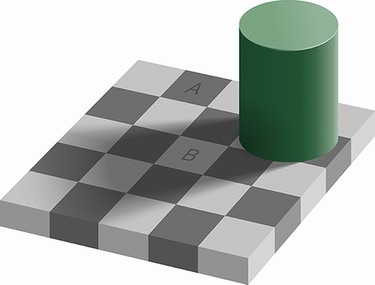
Compare the apparently different squares in Adelson’s checker-shadow illusion to see how surrounding colors and visual context can change color perception. section 9.0
